


Most asset managers figure out their mobile technician SOPs are broken when an insurance claim gets rejected. The inspector took 47 photos of a damaged cooling tower, but none showed the crack location relative to the asset ID plate. The close-ups were too close. The wide shots were too wide. The metadata got stripped during upload. Six months later, you're explaining to legal why your $340,000 claim has no defensible documentation.
The problem runs deeper than photo standards. Mobile technicians are juggling inspection routes, corrective work, and asset transfers while dealing with connectivity issues, device limitations, and time pressure. They're working off three-year-old PDFs on their phones, trying to remember which evidence standards apply to which work type, and making judgment calls without clear acceptance criteria.
The same patterns come up over and over when rebuilding mobile workflows: desktop-designed SOPs that ignore mobile reality, evidence standards written for perfect conditions, and acceptance criteria buried in 50-page manuals nobody reads on a 6-inch screen.
The mobile context changes everything about SOP design
Desktop SOPs assume stable connectivity, large screens, and seated users with both hands free. Mobile technicians work in mechanical rooms with no signal, balance phones while wearing safety gear, and make decisions while equipment alarms are going off.
A facilities management company running around 1,200 mobile inspections monthly found their technicians were completing work offline, then bulk-uploading evidence hours later. Photos got mixed between work orders. Asset transfers showed equipment at wrong locations. Corrective work lacked before-and-after documentation. The data quality issues piled up until they hired a full-time person just to clean it all up.
Traditional SOPs treat mobile access as an afterthought—a PDF viewer bolted onto existing procedures. But mobile work has genuinely different constraints:
Screen real estate forces brutal prioritization. A desktop SOP might show 15 inspection points with detailed instructions. On mobile, technicians see maybe three at a time. They scroll past context, miss dependencies, and lose their place constantly.
Intermittent connectivity breaks linear workflows. Desktop SOPs assume sequential completion: inspect, document, submit, move on. Mobile reality involves starting inspections online, losing signal mid-task, capturing evidence offline, and syncing whenever possible. The SOP has to handle partial saves, offline validation, and conflict resolution.
Environmental factors affect evidence quality. That perfect photo standard—"capture asset nameplate at 3 feet distance with uniform lighting"—becomes impossible in a cramped electrical vault with one flickering bulb. Mobile SOPs need fallback standards and acceptable alternatives.
Device variability creates consistency problems. Some technicians use company iPads with high-res cameras. Others use personal Android phones from 2019. Photo quality, GPS accuracy, and app compatibility vary wildly. The SOP should define minimum acceptable quality, not ideal quality.
Photo evidence standards that survive field conditions
The typical approach to photo standards reads like a photography manual: focal length, resolution, lighting angles. Mobile technicians need something they can execute while standing on a ladder in a poorly lit mechanical room.
Stop losing track of critical assets.
Ownitly helps you monitor, maintain, and manage every asset efficiently and reliably.
- Centralized asset tracking
- Automated maintenance alerts
- Compliance monitoring & reporting
No credit card required
Inspection photos
-
Wide establishing shot
Asset in context, showing location markers
-
Asset ID verification
Nameplate or tag clearly readable
-
Condition focus
Specific issue with reference object for scale
-
Orientation marker
North arrow or building feature for position
A water treatment plant standardized on this four-photo minimum after their previous 12-photo requirement resulted in technicians taking random shots just to hit the count. Quality improved when the focus shifted to four purposeful images rather than quantity.
Corrective work documentation
-
Before state
Problem clearly visible
-
Work in progress
Critical step or repair method
-
After state
Completed repair from same angle as before
-
Verification test
Gauge reading, operation video, or test result
These aren't artistic standards—they're evidence standards. The photo has to prove something specific, not look professional.
Asset transfer evidence
-
Current location
Wide shot with recognizable landmarks
-
Asset condition
Four sides if accessible, or maximum visible angles
-
Serial/ID verification
All identification markings
-
Departure state
Secured for transport or final position
The shift that actually helps: stop asking "what photos do we need?" and start asking "what will someone need to verify six months from now?"
Building acceptance criteria that technicians can actually evaluate
Desktop SOPs bury acceptance criteria in paragraphs of text. A technician standing next to a running compressor needs binary decisions: pass or fail, acceptable or not, escalate or continue.
The most effective mobile acceptance criteria follow a consistent pattern:
Visual indicators first, measurements second. "No visible cracks or deformation" beats "stress tolerance within 15% of specification." Technicians can evaluate visual criteria immediately. Measurements require tools, calculations, and reference lookups.
Graduated severity levels. Not every deviation requires immediate escalation. Clear thresholds matter here:
-
Green
Continue work
-
Yellow
Document and flag for review
-
Red
Stop work and escalate
A manufacturing facility reduced false escalations by around 60% after implementing this three-tier system. Previously, technicians escalated everything borderline to avoid liability.
Contextual overrides. Some "failures" are acceptable given the circumstances. Rust on outdoor equipment in coastal areas is a different conversation than rust in a climate-controlled environment. Build in context modifiers:
-
Location factors (indoor/outdoor, coastal/inland)
-
Age factors (new installation vs. 20-year-old equipment)
-
Criticality factors (backup system vs. primary)
Evidence requirements tied to decisions. Each acceptance decision needs specific evidence:
-
Pass
Single confirmation photo
-
Conditional pass
Multiple angles plus notes
-
Fail
Full documentation set plus video if applicable
Linking evidence to decisions prevents the common problem where technicians mark equipment as "failed" with nothing to support it, triggering unnecessary replacement costs.
Workflow sequencing for unstable connections
Most mobile failures happen during transitions: moving between tasks, switching network states, or jumping between apps. Design workflows that survive these transitions.
Here's a simple workflow diagram to illustrate checkpoint-based, offline-first processes that handle sync and handoffs.
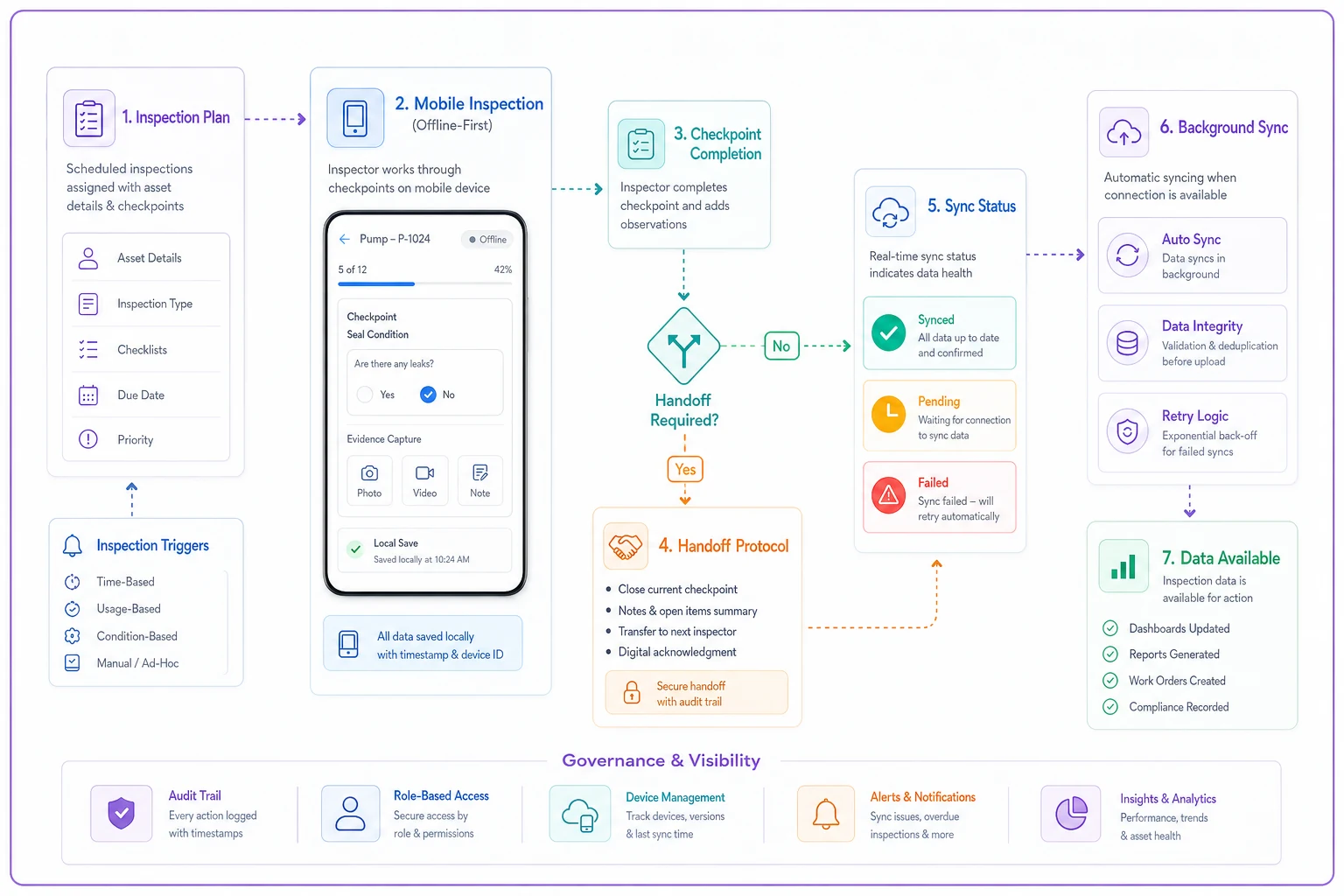
Checkpoint-based progress, not linear completion. Break inspections into independent checkpoints that save locally:
-
Asset identification checkpoint
-
Safety verification checkpoint
-
Inspection execution checkpoint
-
Evidence capture checkpoint
-
Submission checkpoint
Each checkpoint validates and saves independently. Technicians can complete checkpoints in any order, resume from any point, and submit partially if needed.
Offline-first evidence capture. Configure devices to capture everything locally first, then sync when connected. This prevents the frustrating scenario where technicians wait for uploads, timeout, and lose work. A utilities company reduced evidence loss by roughly 80% after switching to offline-first capture with background syncing.
Explicit handoff protocols. Define what happens when work passes between technicians or shifts:
-
Partial work gets tagged with completion percentage
-
Evidence transfers with the work order
-
Next technician sees previous progress clearly
-
System prevents duplicate evidence capture
Connectivity indicators in workflow. Technicians need to know their sync status without hunting through menus:
-
Green dot
Full sync active
-
Yellow dot
Queued for sync
-
Red dot
Offline mode
-
Number badge
Items pending upload
This simple indicator prevents technicians from leaving sites thinking their work uploaded when it's actually still sitting in a queue.
Evidence packaging that passes audit
Individual photos mean nothing without context. Mobile SOPs must define how evidence gets packaged for downstream consumption.
Structure evidence packages around the questions auditors actually ask:
| Question | Evidence Element |
|---|---|
| When was this captured? | Timestamp |
| Where specifically? | GPS + manual location notes |
| Who captured it? | Technician ID + certification status |
| What equipment/asset? | ID + description |
| Why this evidence? | Linked to specific requirement |
| What happened next? | Disposition + follow-up |
A chemical plant failed an EPA audit because their mobile evidence lacked chain of custody documentation. Photos existed, but no proof of when, where, or by whom. They now require:
Metadata preservation. Original timestamp, GPS coordinates, and device information must persist through all transfers. This seems obvious until you realize most email and messaging apps strip EXIF data.
Evidence bundling by work order. All photos, videos, and notes for a single work order travel together. No orphaned photos in camera rolls. No videos sitting in separate systems.
Automated package assembly. Technicians shouldn't be manually compiling evidence packages. The system should auto-generate packages with a cover sheet showing work order details, an evidence inventory listing all files, individual evidence items with captions, technician sign-off confirmation, and a timestamp certificate.
This automation cut about 15 hours of weekly manual evidence compilation at a facility management company running 400+ mobile inspections.
Micro-scripting for complex decisions
Some field decisions can't be reduced to simple yes/no criteria. For complex evaluations, provide micro-scripts that guide technician judgment.
Instead of "evaluate bearing condition," provide:
-
Listen for grinding or squealing
-
Feel for excessive vibration
-
Check for visible wear indicators
-
If any present → capture video evidence
-
If multiple present → escalate immediately
These micro-scripts work because they break complex evaluations into observable steps, specify evidence requirements for each decision branch, and remove ambiguity about escalation triggers. An HVAC service company reduced callback rates by around 35% after implementing micro-scripts for system evaluations. Technicians made more consistent decisions, captured better evidence, and escalated appropriately.
Mobile form optimization beyond basic fields
The standard mobile form—text fields, dropdowns, checkboxes—forces technicians into data entry mode when they should be focused on observation and safety.
Progressive disclosure. Show only relevant fields based on previous answers. If equipment is "operational," hide all failure-related fields. This reduces scroll fatigue and accidental entries.
Smart defaults from context. Pre-populate fields based on GPS location, previous inspection data, asset type, and shift time. A technician inspecting the same pump weekly shouldn't re-enter static information every time.
Voice-to-text with industry dictionary. Generic voice recognition mangles technical terms. Train custom dictionaries with industry terminology, asset names, and common findings. "Cavitation on impeller" shouldn't become "invitation on propeller."
Photo annotation tools. Let technicians mark up photos directly—arrows pointing to defects, circles around areas of concern, text overlays with measurements, before/after comparison sliders. Annotated photos communicate issues faster than photos plus separate descriptions.
Handling the offline-to-online transition
The most dangerous moment in mobile workflows is during sync. Hours of offline work either upload successfully or disappear.
Pre-sync validation. Before attempting sync, verify all required fields are completed, minimum evidence is attached, GPS coordinates are present, and offline duration is acceptable. Reject sync attempts that will fail downstream rather than accepting bad data.
Conflict resolution rules. When multiple technicians edit the same asset offline, you need defined rules before conflicts happen—not during crisis recovery. Common approaches include timestamp priority (latest wins), technician seniority priority, manual review requirements, or merging non-conflicting changes.
Sync receipts and confirmations. Technicians need proof their work uploaded. Without confirmation, they either re-submit (creating duplicates) or assume success (losing data). Email summaries, in-app notifications, work order status changes, and evidence thumbnail previews all help.
Training mobile SOPs through micro-learning
Traditional SOP training assumes classroom time, desktop computers, and focused attention. Mobile technicians learn differently—in five-minute breaks, on their phones, between tasks.
Scenario-based micro-lessons. Instead of "Chapter 3: Evidence Standards," create "What to do when you can't photograph the nameplate" (2-minute video). These address specific situations technicians actually encounter.
In-context help triggers. Embed help directly in workflows: question mark icons next to complex fields, pop-up reminders for critical steps, example photos for reference, quick validation checklists. Technicians won't stop to read manuals, but they'll tap a help icon when stuck.
Peer example libraries. Let experienced technicians submit exemplar evidence that becomes reference material—good vs. bad photo comparisons, successful repair videos, tricky situation solutions. Real examples from peers carry more weight than anything from corporate training materials.
Common failure patterns in mobile technician SOPs
Understanding how mobile SOPs fail helps prevent predictable problems:
The batch upload disaster. Technician completes 20 inspections offline, uploads all at once, crashes the system or scrambles data. Prevention: limit offline batch sizes, force periodic syncs, queue uploads sequentially.
The version control mess. Half the team uses old SOP versions cached on their devices. Prevention: force version checks on launch, expire cached content, show version numbers prominently.
The device swap scramble. Technician's phone dies, borrows another, can't access previous work. Prevention: cloud-based state management, device-independent work queues, guest device protocols.
The partial submission trap. Technician submits incomplete work thinking they'll finish later, never returns. Prevention: completion percentage requirements, return-to-finish reminders, partial work aging alerts.
The evidence overload burnout. Requirements grow until technicians spend more time documenting than doing actual work. Prevention: regular evidence audits, remove unused requirements, measure documentation time.
Measuring mobile SOP effectiveness
Track metrics that matter for mobile work:
| Metric | What It Reveals |
|---|---|
| First-time completion rate | Unclear SOPs, missing tools, or unrealistic requirements |
| Evidence rejection rate | Standards not clear or not achievable in field conditions |
| Offline duration average | Trust issues with sync process or connectivity problems |
| Sync failure frequency | Workflow friction encouraging workarounds |
| Time-to-evidence | Gap between work completion and evidence availability |
A facilities company tracking these metrics found technicians were averaging 3.5 hours offline because they didn't trust the sync process. After implementing confirmed sync receipts and retry mechanisms, offline duration dropped to around 40 minutes.
When AI-powered operational software transforms mobile workflows
Managing mobile technician SOPs manually becomes genuinely overwhelming as operations scale. Each technician works differently, every site has unique constraints, and evidence requirements constantly evolve.
AI-powered operational software addresses these challenges by automating the intelligence layer that sits between technicians and systems. Instead of rigid SOPs that break in the field, the software can dynamically adjust workflows based on context: technician experience, equipment history, site conditions, and real-time operational needs.
For example, AI automation can pre-stage inspection routes based on technician location and equipment criticality, automatically validate photo evidence against requirement matrices, and flag quality issues before submission. When technicians work offline, the system queues and prioritizes syncs, resolves conflicts based on business rules, and verifies evidence completeness before anything gets submitted.
The real value shows up in evidence processing. Rather than manual review of hundreds of photos, the platform can verify that each image meets specific criteria—nameplate visibility, defect clarity, reference object presence—and extract information like gauge readings, serial numbers, and condition indicators to auto-populate fields. Less data entry burden on technicians, fewer errors making it downstream.
This isn't about replacing technician judgment. It's about eliminating the administrative friction that makes mobile work frustrating. Technicians focus on technical work while the software handles evidence organization, compliance validation, and workflow coordination.
Building mobile SOPs that technicians actually follow
The best mobile technician SOPs disappear into the work itself. Technicians shouldn't be thinking about the SOP—they should be thinking about the equipment, safety, and quality while the SOP guides them in the background.
That requires a fundamental shift in how mobile workflows get designed. Stop converting desktop procedures to PDFs. Stop adding fields to forms. Stop treating mobile as a data collection terminal.
Design for the actual mobile reality: unstable connections, difficult environments, time pressure, and device limitations. Build workflows that survive these constraints rather than assuming them away.
The operations teams succeeding with mobile technician SOPs share common characteristics. They prioritize evidence quality over quantity. They provide clear, contextual acceptance criteria. They design for offline-first operation. They automate the tedious parts while preserving technician judgment where it matters.
Mobile work isn't desktop work on a smaller screen. It's a fundamentally different operational context that demands purpose-built SOPs. Once you accept that and design accordingly, mobile technician effectiveness stops being a persistent problem and starts becoming a genuine competitive advantage.
Ready to elevate your asset operations?
Join 1,500+ businesses using Ownitly to optimize asset utilization, reduce downtime, and ensure compliance.