


Most CMMS migrations fail before the first work order gets created in the new system. Not because the software doesn't work. Not because training falls short. They fail because years of accumulated data chaos gets exposed the moment you try moving 50,000 asset records from one platform to another.
An asset manager at a chemical processing facility found this out the hard way. Their team spent four months selecting a new CMMS, negotiating contracts, planning workflows. Migration weekend arrives. The data transfer starts Friday night. By Saturday morning, they're staring at 12,000 duplicate asset records, 8,000 orphaned spare parts entries, and equipment hierarchies so scrambled that pump P-1234 shows up as both a child of Tank T-500 and somehow also its parent.
Monday morning? Complete operational paralysis. Technicians can't find equipment. Parts can't get ordered. PM schedules are triggering for assets that were scrapped three years ago. The plant manager calls an emergency meeting. The verdict: roll everything back, keep using the old system, try again in six months.
This plays out constantly across manufacturing plants, hospitals, universities, distribution centers. Organizations spend hundreds of thousands on new CMMS platforms only to discover their master data is fundamentally broken. Not just messy — structurally corrupted in ways that make migration nearly impossible without serious cleanup first.
Why master data turns into operational quicksand
Your CMMS data didn't become a disaster overnight. It accumulated problems through thousands of small compromises over years of daily operations.
A maintenance tech creates a new asset record for a replacement motor but doesn't link it to the existing equipment hierarchy. Someone else adds the same motor under a slightly different naming convention. Purchasing creates their own part numbers that don't match maintenance's system. A contractor doing weekend work adds equipment using their own asset tagging scheme.
Each individual decision made sense at the time. The tech needs to close out a work order. Purchasing needs to expedite a PO. The contractor needs to document their installation. Nobody has time to check whether MotorPump02B is the same as MOTOR-PUMP-2B or MP02B. The CMMS accepts all of it.
Fast forward five years. You've got the same centrifugal pump listed fourteen different ways. Critical spare parts linked to asset IDs that no longer exist. Parent-child relationships that create circular references. Maintenance history scattered across duplicate records. Cost data that can't be rolled up because the hierarchy breaks three levels down.
The old CMMS keeps running because everyone knows the workarounds. Sarah in maintenance knows that "Compressor Unit 3" and "3rd Floor AC Compressor" are the same machine. Mike in the warehouse has memorized which part numbers actually work. These human patches mask the underlying data catastrophe.
Then migration day arrives. The new system has no tolerance for any of it. It demands clean hierarchies, unique identifiers, valid relationships. Suddenly every data quality issue that's been hiding for years surfaces at once.
The three-phase cleanup framework that actually works
After watching dozens of migrations crater, you start to see patterns in what separates successful data transfers from six-month rollback disasters. The organizations that succeed don't try to fix everything at once. They work through a phased approach that delivers incremental value while keeping operations running.
Stop losing track of critical assets.
Ownitly helps you monitor, maintain, and manage every asset efficiently and reliably.
- Centralized asset tracking
- Automated maintenance alerts
- Compliance monitoring & reporting
No credit card required
Phase 1: Quick wins and critical stabilization (Weeks 1–3)
Start with the data problems that are actively breaking things right now, even in your current system. These quick wins build momentum and immediately improve daily operations.
Focus on duplicate asset elimination first. Run a report of all assets by model number, serial number, and location. You'll typically find 15–30% are duplicates with slight naming variations. Create a consolidation map showing which record becomes the primary and which get archived. Don't delete anything yet — archive with full traceability.
-
Standardized naming convention
-
Correct hierarchy placement
-
Valid location data
-
Accurate criticality ratings
-
Linked maintenance history
Next, fix broken parent-child relationships. Export your equipment hierarchy and look for circular references where Asset A is the parent of Asset B, but Asset B is somehow also the parent of Asset A. These logical impossibilities will crash migration scripts instantly. Map out the correct relationships on paper first, then update the CMMS systematically.
Standardize your top 100 most critical assets. Don't try to fix all 50,000 records right away. Identify the equipment that would shut down operations if it failed and make sure these have complete, accurate records including:
A midsize food processing plant found that getting just their 100 critical assets properly structured eliminated around 60% of their daily data-related work delays. Technicians could actually find equipment. Parts got ordered correctly. PM schedules made sense.
Phase 2: Systematic normalization and enrichment (Weeks 4–8)
With critical assets stabilized, expand the cleanup systematically. This phase is about establishing data standards that will hold after migration.
Create your master naming convention document. Not a 50-page manual nobody will read — a simple two-page reference showing the asset naming structure, examples, an acceptable abbreviations list, and hierarchy rules covering what can be a parent and what must be a child.
-
Replace multiple spaces with single spaces
-
Standardize capitalization
-
Remove special characters that break imports
-
Trim leading/trailing spaces
-
Fix common abbreviations (Mtr → Motor, Cmpsr → Compressor)
Build your spare parts crosswalk. This is where things get tedious but crucial. Export all part numbers from both maintenance and purchasing systems. Create a master mapping table that captures the maintenance part number, purchasing part number, vendor part number, common description, and which assets use each part. The crosswalk becomes your rosetta stone during migration. When the new system asks which part number to use, you have a definitive answer instead of guessing.
Validate manufacturer and model data too. Around 40% of asset records have manufacturer names spelled multiple ways — Siemens, SIEMENS, Siemens AG, Seimens. Create a standard manufacturer list, map all variations to the correct spelling, and do the same for model numbers.
Start your master naming convention with examples from your top 10 failure-prone assets to make the rules practical and immediately useful.
Phase 3: Migration controls and rollback protection (Weeks 9–12)
This phase is about protecting yourself when things go wrong. And something always goes wrong during migration.
-
Migrate 100 critical assets first
-
Validate completely before proceeding
-
Migrate 1,000 assets next
-
Validate again
-
Continue in increments until complete
Each checkpoint needs specific validation criteria covering record count against the source system, hierarchy relationships, history data, parts linkages, and document attachments.
Build parallel run controls. For the first month after migration, run both systems simultaneously for critical processes. Yes, this means double entry for some tasks. But it also means you catch problems before they become emergencies.
-
More than 10% of assets fail validation
-
Critical equipment history is lost
-
Integration with ERP fails
-
PM schedules don't generate correctly
Document the exact rollback procedure. Who makes the decision? How long does rollback take? What's the data recovery process? Having this written down removes panic from the equation when things get messy.
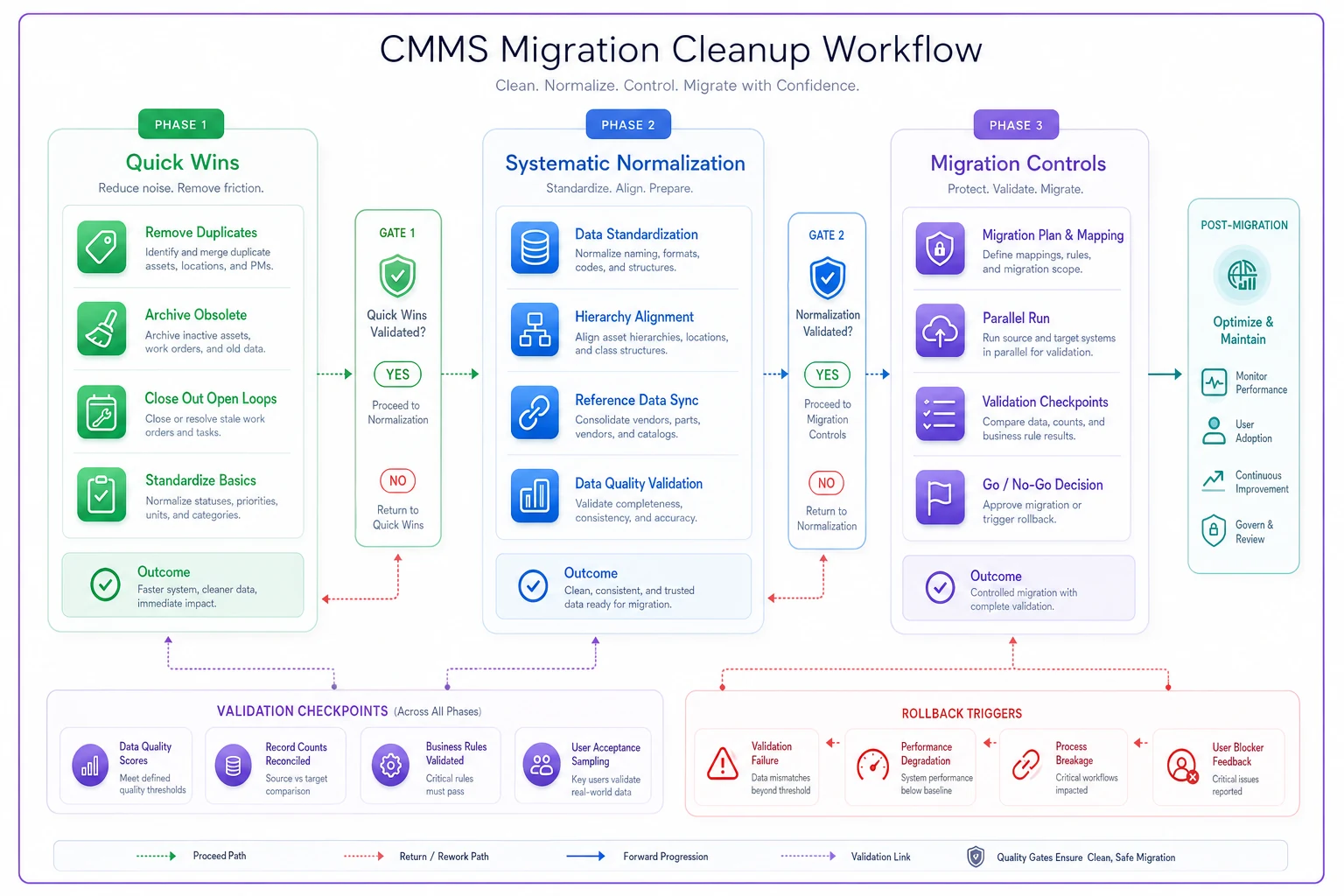
A simple visual of the three phases with checkpoints and rollback points makes the migration plan easier to communicate to stakeholders.
Ensure each migration chunk is tested, validated, and signed off before proceeding to the next stage.
The hidden complexity of asset hierarchies
Asset hierarchies seem simple until you try to migrate them. In the old system, informal relationships and tribal knowledge fill the gaps. Migration forces everything into rigid parent-child structures, and that's where things fall apart.
A university maintenance team discovered their chilled water system was simultaneously listed under three different buildings. Technically impossible, but the old CMMS allowed it through some quirk in its database structure. The new system rejected the entire hierarchy.
The fix requires mapping out physical reality first, then updating the data to match. Walk the facility. Draw the actual relationships. A chiller can only physically exist in one location. Piping can serve multiple buildings but has to originate somewhere specific. Once you map reality, updating the hierarchy is relatively straightforward.
-
Assets with multiple parents
-
Missing intermediate levels (pump connected directly to building instead of to a system)
-
Equipment listed at the wrong hierarchy level (a bearing shown as parent to a motor)
-
Phantom assets that exist in the CMMS but not in reality
Address these common problems by validating relationships on the floor and reconciling them with the CMMS data model before migration.
Managing spare parts chaos during transition
Spare parts data is often worse than asset data because it involves multiple departments with different priorities. Maintenance wants technical accuracy. Purchasing wants vendor simplicity. Accounting wants cost tracking. The CMMS tries to serve all three and usually serves none of them well.
During migration, parts data problems multiply. The same bearing might exist as BRG-6205-2RS in maintenance, BEARING,BALL,25X52X15 in purchasing, SKF 6205-2RSH from the vendor, and Spare Parts Inventory #4782 in accounting.
A manufacturing plant discovered they were stocking the same hydraulic filter under seven different part numbers across three storerooms. Each department ordered their own version. Together they had roughly $45,000 in duplicate inventory that nobody knew about.
The solution starts with a parts rationalization exercise before migration:
-
Export all parts data from all systems
-
Group by description keywords
-
Identify potential duplicates
-
Verify with physical inventory counts
-
Create a single source of truth
-
Map all variations to the master record
-
Update all systems with the mapping
This process typically reveals a 20–40% reduction in unique part numbers. One facility went from 12,000 part numbers down to around 7,500 after rationalization. The migration became significantly simpler with fewer records to transfer.
Protecting maintenance history through the move
Maintenance history is irreplaceable. Once lost, you can't recreate what broke when, what fixed it, how much it cost. Yet history data is often the first casualty of migration.
The problem starts with incompatible data structures. Your old CMMS might store work order history one way. The new system expects it completely differently. Field mappings don't line up. Date formats conflict. Cost calculations use different methods.
A hospital learned this after migrating their CMMS and discovering five years of critical equipment history was now "archived" in an inaccessible format. Regulatory audits require that history. Equipment warranty claims need it. Failure pattern analysis depends on it. But it might as well not exist if nobody can access it.
Protecting history requires deliberate planning. First, identify what history actually matters — not all data is equal. Focus on failure history for critical equipment, regulatory compliance records, warranty-related work orders, major repair documentation, and cost history for budget planning.
-
Export all history to a neutral format (CSV/Excel)
-
Store copies outside both systems
-
Document field mappings explicitly
-
Test history queries before full migration
-
Maintain the old system in read-only mode for at least a year
Third, validate history transfer at multiple points by sampling 100 work orders to compare old versus new, checking date accuracy, verifying cost calculations, confirming file attachments transferred, and testing history reports.
Building validation gates that prevent disaster
Most migrations fail because problems compound invisibly until it's too late. By the time someone notices duplicate assets or missing history, thousands of records are already corrupted.
Validation gates create forced stopping points where problems must get fixed before you proceed. Like quality checkpoints in manufacturing — you don't let defective products continue down the line.
| Gate | Name | Key Criteria |
|---|---|---|
| Gate 1 | Pre-migration data quality | 95% standardization on critical assets, zero circular references, all duplicates resolved, parts crosswalk complete |
| Gate 2 | Test migration validation | 100 critical assets migrate successfully, history transfers completely, hierarchies maintain structure, integrations connect |
| Gate 3 | Partial production migration | 10% of assets in production, all workflows function correctly, reports generate accurately, no performance degradation |
| Gate 4 | Full migration validation | All assets transferred, history queryable, integrations operational, user acceptance confirmed |
Each gate has a clear go/no-go decision. Miss the criteria, stop and fix. This prevents the "we're too far along to stop now" mentality that turns recoverable problems into failed implementations.
When to pull the trigger on rollback
Sometimes, despite all preparation, migration fails badly. The key is recognizing when to stop digging the hole deeper.
A regional utility company pushed through a problematic migration despite mounting issues. Asset hierarchies were scrambled but "we can fix that later." Work order history was partially corrupted but "most of it transferred fine." Parts data had thousands of orphaned records but "purchasing can clean that up."
Six months later, they were still fixing problems. Maintenance costs had climbed around 30% due to inefficiencies. Technician productivity dropped. PM compliance fell below regulatory requirements. The total cost of fixing the botched migration exceeded what it would have cost to start over from scratch.
-
More than 20% of critical assets have data issues
-
Integration with ERP/financial systems fails
-
Regulatory compliance data is corrupted
-
PM schedules generate incorrectly for critical equipment
-
Work order creation takes three times longer than the old system
If any trigger hits, stop. Don't negotiate. Don't rationalize. Execute the rollback plan.
The rollback plan itself needs to be bulletproof:
-
Stop all data entry in the new system
-
Export any new records created
-
Restore old system from backup
-
Import new records into old system
-
Verify old system is fully operational
-
Document lessons learned
-
Plan remediation before the next attempt
Stopping and restoring the old system quickly limits operational damage and gives you time to plan a proper remediation.
The operational reality after migration
Even successful migrations create temporary operational chaos. Technicians need to relearn workflows. Managers must adapt to new reports. Purchasers have to understand new part numbering.
A pharmaceutical plant that executed a textbook migration still saw maintenance productivity drop around 20% for the first month. Not from system problems — from human adjustment. Experienced technicians who could navigate the old system blindfolded suddenly spent five minutes finding the right screen in the new one.
Preparation for this reality includes creating quick reference cards for common tasks, setting up a temporary help desk for questions, planning for slower work order completion initially, building buffer into maintenance schedules, and identifying power users as floor-level support.
The productivity hit is temporary if the migration was clean. Within 60–90 days, efficiency typically exceeds the old system as people adapt and the data quality improvements start paying off.
Building long-term data governance
Clean data at migration is just the starting point. Without governance, you'll recreate the same mess within two years.
Effective governance doesn't mean bureaucracy. It means simple, enforceable standards:
-
One person owns the asset creation process
-
Naming conventions are non-negotiable
-
Monthly data quality audits catch drift early
-
Purchasing can't create parts without maintenance approval
-
Contractors must follow internal standards
A distribution center implemented these basic controls after migration. Two years later, their data quality metrics still exceeded 95%. The key was making governance part of operations, not a separate initiative that sits in a policy document nobody reads.
The software automation advantage
Modern CMMS platforms increasingly incorporate AI-powered data management that helps prevent bad data from accumulating in the first place. Automated duplicate detection flags potential issues before they compound. Natural language processing can standardize descriptions as they're entered. Machine learning identifies hierarchy anomalies that humans might miss during normal operations.
The real value comes from continuous data quality monitoring. Instead of discovering problems during migration, these tools surface issues immediately — catching duplicate assets when they're created, flagging suspicious parent-child relationships, identifying parts that might be duplicates based on description similarities.
That proactive approach means your next migration starts from a position of strength rather than crisis. Some platforms now use AI to suggest data standardization rules based on patterns in your existing data, analyzing your current assets and proposing logical structures rather than requiring you to build naming conventions from scratch. When it works well, it can compress the three-phase cleanup from 12 weeks down to somewhere in the 4–6 week range.
CMMS migrations fail when organizations underestimate data complexity. Years of accumulated inconsistencies, duplicates, and broken relationships create hidden failure points that only surface when you try to move everything to a new system.
The three-phase approach — quick wins, systematic normalization, and migration controls — provides a structured path through the chaos. It's not about perfection. It's about achieving sufficient data quality that the new system can function while you continue improving.
Plan for failure. Build validation gates. Create rollback triggers. Document recovery procedures. When problems surface — and they will — you'll have clear actions instead of panic.
The organizations that succeed treat data cleanup as an operational project, not an IT project. They involve the people who actually use the data daily. They fix problems that matter for operations, not abstract data quality metrics. They build governance that fits their workflow rather than forcing their workflow to fit governance.
Your maintenance data might be a mess right now. That's completely normal — almost everyone's is. The difference between successful and failed migrations isn't starting with perfect data. It's following a disciplined process to make it good enough, then better over time.
Ready to elevate your asset operations?
Join 1,500+ businesses using Ownitly to optimize asset utilization, reduce downtime, and ensure compliance.