

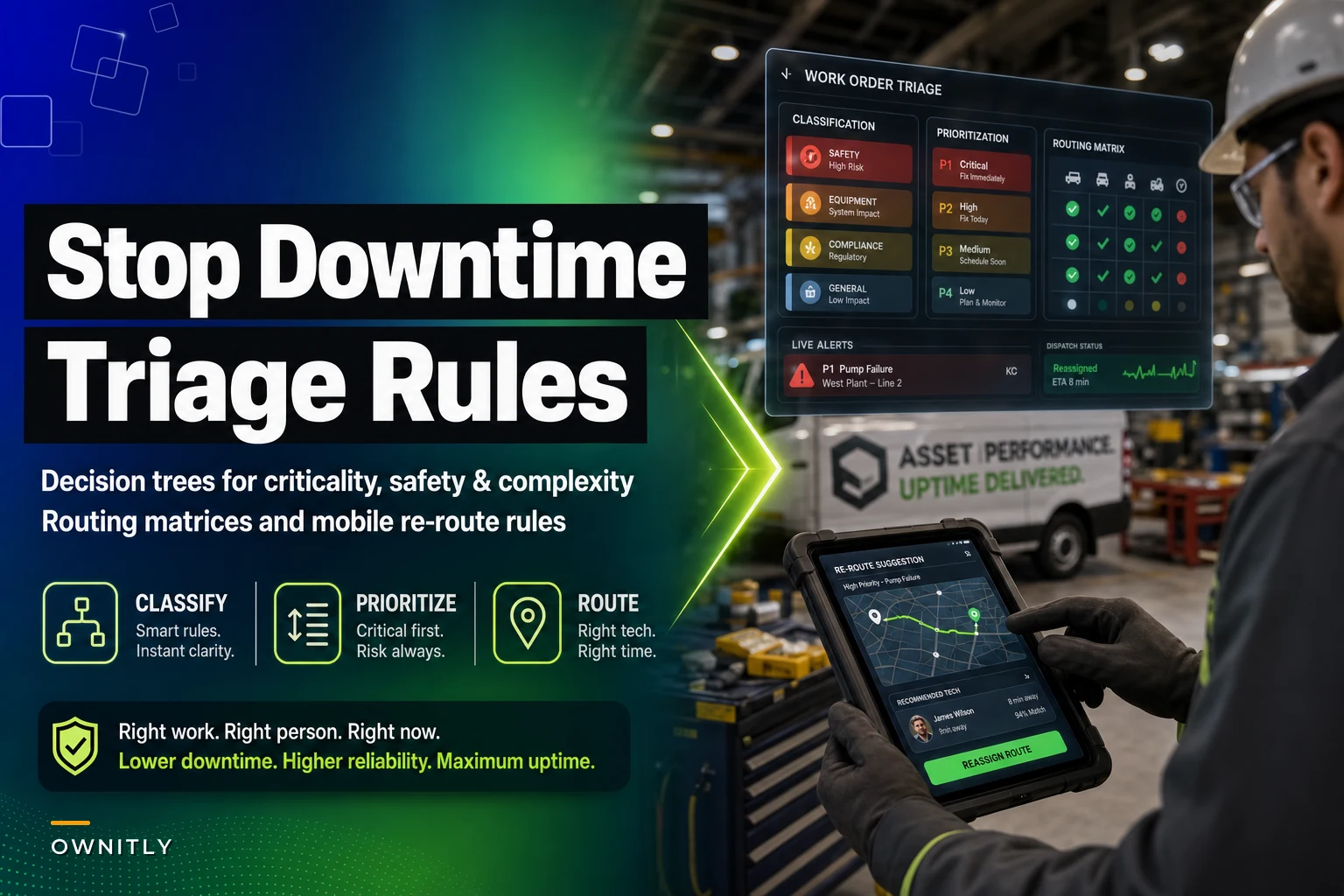

Three turbines down at a wind farm. A chiller alarm at the hospital. Two production lines halted at a packaging plant. Your maintenance team gets 40+ work orders before lunch, and everyone swears theirs is critical.
Without clear triage rules, decisions get made on gut instinct under pressure. The squeaky wheel gets the grease — literally. That packaging line stays down for six hours while techs rush to fix a non-critical HVAC unit because the office manager called three times. The actual critical repair sits in queue bleeding money.
Most organizations think they have prioritization figured out. They'll show you their P1-P2-P3 system. Ask what actually separates P1 from P2, and you'll get vague answers about "business impact" and "safety concerns." Push harder on the routing logic — who gets assigned what, when, and why — and the whole thing usually falls apart.
The real problem isn't bad priority codes. It's the absence of prescriptive decision trees that connect asset criticality, safety impact, repair complexity, and resource availability into clear routing actions. Technicians need more than a priority number. They need to know which work order to tackle next, who should handle it, and what path to take through the repair.
The hidden cost of triage failures
Poor work-order triage creates cascading failures that compound over time. A pharmaceutical company pulled six months of downtime data and only then realized their triage was broken. Their cleanroom HVAC units — genuinely critical for product quality — averaged 14-hour repair times. Not because the repairs were complex. Techs kept getting pulled to "emergencies" in the admin building.
The data made it obvious. Critical production assets sat broken for 8-12 hours on average. Non-critical comfort systems got fixed within 2-3 hours. The maintenance manager's defense was "we respond to whoever calls first" — which was exactly the problem.
Direct downtime impact:
-
Production losses from delayed critical repairs
-
Quality issues from deferred preventive work
-
Overtime from poor resource allocation
-
Emergency contractor fees for neglected failures
Indirect operational damage:
-
Technician burnout from constant firefighting
-
Senior techs handling simple tasks while apprentices struggle with complex ones
-
Compliance risks from missed regulatory maintenance
-
Shortened asset life from band-aid fixes
A food processing plant tracked triage effectiveness for three months and found 67% of their "emergency" work orders weren't emergencies at all — just loud complaints from influential departments. Real critical repairs averaged 11-hour response times because resources were already tied up elsewhere.
Building prescriptive decision trees that actually work
Effective triage starts with clear classification logic, not vague priority buckets. You need decision trees that evaluate multiple factors simultaneously and produce specific routing instructions.
Stop losing track of critical assets.
Ownitly helps you monitor, maintain, and manage every asset efficiently and reliably.
- Centralized asset tracking
- Automated maintenance alerts
- Compliance monitoring & reporting
No credit card required
Asset criticality scoring: Criticality isn't binary. A proper scoring matrix considers production impact, redundancy availability, regulatory requirements, and downstream dependencies. A backup pump might be non-critical until the primary fails. A small conveyor might be critical if it's the only path between two production stages.
Safety and compliance factors: Safety issues automatically elevate priority, but not all safety concerns are equal. A missing guard rail on elevated equipment demands immediate action. A slightly worn anti-slip surface might wait for the next scheduled downtime. Your decision tree needs clear thresholds for different safety categories.
Repair complexity assessment: This one gets ignored constantly, which leads to senior techs changing light bulbs while apprentices struggle with complex alignments. Complexity scoring considers required skills, special tools, estimated duration, and permit requirements.
The routing matrix in practice
| Criticality | Safety Impact | Complexity | Primary Route | Backup Route | Escalation Time |
|---|---|---|---|---|---|
| Production Critical | Immediate Risk | High | Senior Tech + Support | Contractor On-Call | 30 minutes |
| Production Critical | No Safety Risk | Low | Any Available Tech | Cross-trained Operator | 2 hours |
| Infrastructure | Compliance Risk | Medium | Certified Specialist | Senior Tech + OEM Support | 4 hours |
| Support Systems | Minor Risk | Low | Apprentice + Remote Guidance | Any Tech | Next Shift |
| Administrative | No Risk | Low | Scheduled Batch Work | Deferred to PM | Next PM Window |
This is simplified. Real implementation requires somewhere around 15-20 decision nodes minimum to handle edge cases and resource constraints.
Below is a rough look at how a work order moves through a triage system — from incoming request to routed assignment:
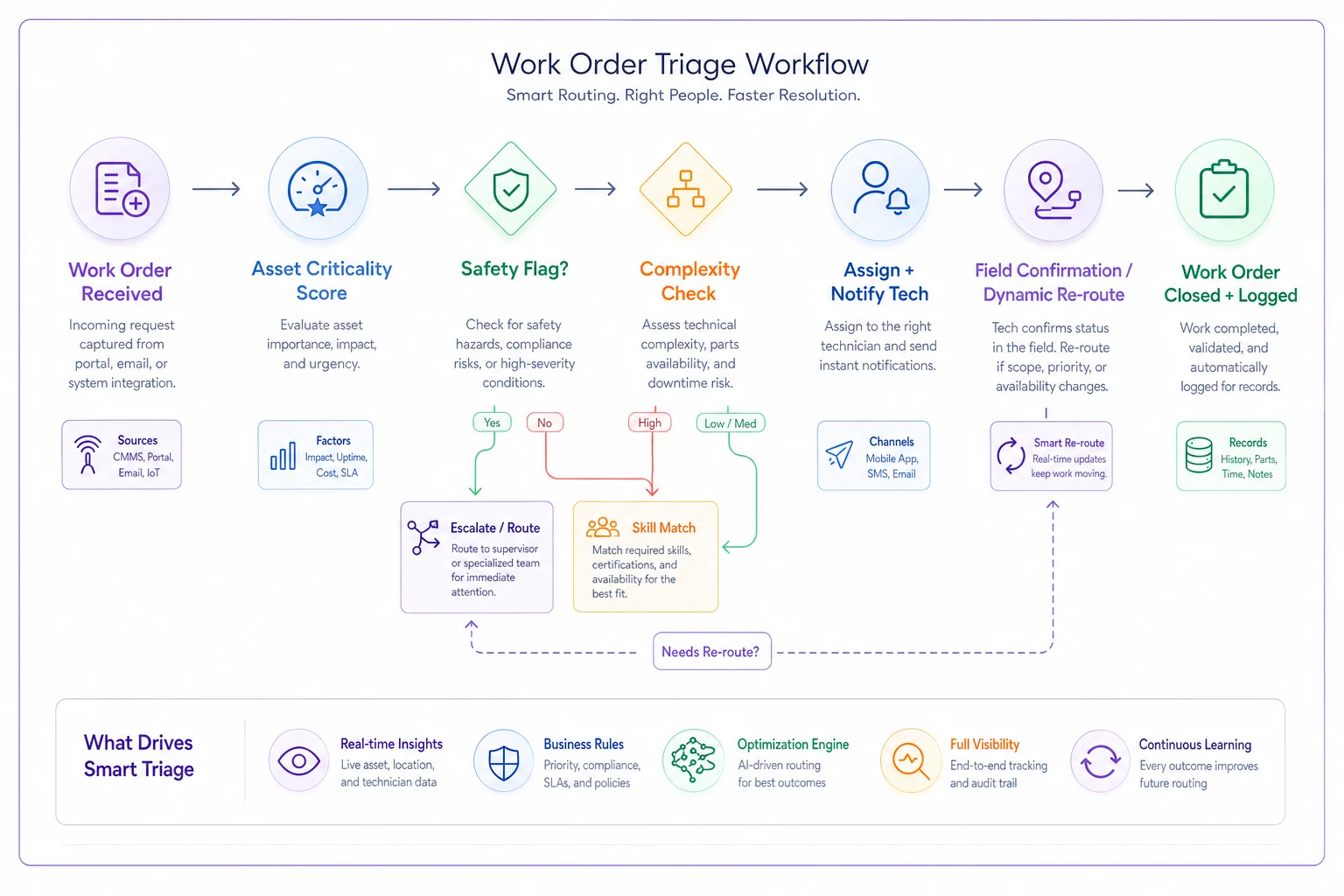
It's not glamorous, but mapping it out like this is usually where teams realize their actual process is nothing like what they thought it was.
Mobile routing rules that follow technicians
Desktop routing matrices mean nothing if technicians can't access them in the field. Mobile routing rules need different design principles than office-based dispatch systems.
Mobile-first triage considers the technician's current context — physical location relative to new work orders, current task completion status, available tools and materials on hand, certification dates, and fatigue based on shift duration.
A water treatment facility implemented location-aware routing and cut response times by around 40%. Instead of sending techs across a 200-acre campus for every new priority, the system routes by proximity when skill requirements match. Critical work still takes priority, but a tech finishing a job in Building A handles the P2 next door before driving to Building F for a P3.
The mobile interface strips away complexity. Technicians see a prioritized work queue, not the full decision matrix. Color coding handles urgency — red for safety-critical, orange for production-critical, yellow for important, green for routine. The routing algorithm runs in the background, updating assignments as jobs close and new ones arrive.
Dynamic re-routing based on field conditions
-
If parts delay exceeds 2 hours, reassign tech to next critical work
-
If repair complexity exceeds estimate, request backup before the escalation threshold
-
If a safety risk emerges, immediately escalate and re-route qualified resources
-
If multiple criticalities conflict, apply tie-breaker logic based on downtime cost
These rules run automatically through the mobile platform, but techs can override with justification.
Log every override with a brief justification in the mobile app so you can analyze patterns later.
The system logs all routing decisions and overrides, which feeds into continuous improvement.
Common triage mistakes that create more problems
Everything is P1 syndrome When requesters learn that P1 gets faster response, everything becomes P1. One manufacturing site had 78% of work orders marked at the highest priority. The maintenance team stopped using priorities entirely and just worked through orders by submission time.
Fix this by requiring justification fields for high-priority requests and reviewing priority accuracy weekly. Show requesters what happens when everything is urgent — the critical stuff stops getting treated as critical.
The VIP override problem Every organization has the executive who calls the maintenance manager directly to jump the queue. These overrides destroy triage discipline and signal to everyone that rules are optional.
Document every override with business justification. Track what didn't get fixed as a result. Present that data quarterly so leadership can see the actual cost of queue-jumping.
Skill-based hoarding Supervisors hold their best technicians in reserve for "important" work that might come up. Actual critical repairs wait because the qualified tech is "reserved." This phantom assignment problem wastes a significant chunk of available labor hours.
Visual resource boards showing real-time tech assignments fix this fast. Empty slots require justification. If you're holding resources for potential work, that work needs to materialize within a couple of hours or the tech goes back to the pool.
When automated triage makes sense (and when it doesn't)
AI-powered triage systems can process more variables faster than any human dispatcher. They're genuinely good at pattern recognition — identifying which pump failures cascade into production stops, or which alarm combinations signal imminent failure.
Automated triage works best for:
-
High-volume work order environments with 50+ daily orders
-
Multi-site operations with remote assets
-
Clear measurable decision criteria
-
Consistent repair patterns and resource pools
But automation struggles when human judgment matters. A strange noise from a compressor might be nothing, or it might be catastrophic failure developing. An experienced tech knows the difference; an algorithm often doesn't.
The sweet spot combines human experience with automated efficiency. Let the system handle routine classification and routing while humans review edge cases and override when needed. Track override patterns to improve the algorithm — if humans consistently override certain routing decisions, the rules need adjustment.
Several operational software platforms now incorporate intelligent triage capabilities that learn from historical patterns. They analyze past work orders, downtime events, and technician performance to continuously refine routing rules. Rather than static decision trees, they build probabilistic models that predict likely failure cascades and optimal resource allocation. Keep humans in the loop though. Automated triage should suggest, not dictate. Technicians and supervisors need clear visibility into why the system made a specific routing decision, with easy override capability when field knowledge matters more than the algorithm.
Measuring triage effectiveness with real metrics
Most organizations measure maintenance performance with lagging indicators — MTBF, MTTR, uptime percentage. These tell you what happened, not whether your triage rules are working.
Response time by true criticality Plot actual response times against post-incident criticality assessment. If non-critical work consistently gets faster response than critical work, your triage is failing.
First-touch resolution rate How often does the first assigned technician complete the repair? Low rates indicate poor skill-matching in your routing logic.
Override frequency and impact Track both human overrides of automated routing and supervisor overrides of standard rules. High override rates usually mean the triage logic is broken somewhere.
Queue time stratification Measure how long work orders sit in queue by criticality tier. Critical work should never queue; routine work might sit for days. If the distribution looks random, triage isn't working.
Resource utilization by criticality What percentage of senior tech time actually goes to complex, critical work? If experienced technicians spend half their time on routine repairs, your complexity assessment needs work.
A chemical processing facility tracked these metrics for six months after implementing new triage rules. They found their "critical" classification was too broad — roughly 40% of critical work orders were actually moderate priority. After refinement, true critical response time dropped from 4.5 hours average down to 47 minutes. That's not a small improvement.
Building your own triage framework
Start with an honest look at your current state. Pull six months of work order data and ask:
-
How many priority levels does your team actually use (not what's in the system, but what gets assigned)?
-
What percentage of work orders fall into each tier?
-
How does actual response time correlate with assigned priority?
-
How often do technicians get pulled from one job to another mid-repair?
Then map your real decision factors. Interview dispatchers, supervisors, and senior technicians. What actually drives their routing decisions? You'll likely find unofficial rules — "Building 3 always gets priority" or "Tech A handles all pump work regardless of priority." This tribal knowledge exists in most facilities, and it matters more than people admit.
Design your classification matrix around these realities, not theoretical ideals. If certain equipment always gets priority because of production contracts, build that into the formal rules instead of relying on whoever happens to remember.
For routing logic, start simple and add complexity gradually:
-
Define 3-5 true criticality levels with clear, specific boundaries
-
Identify binary safety and compliance flags that override standard priority
-
Create basic skill-matching rules for technical complexity
-
Establish location-based routing for multi-building facilities
-
Add dynamic re-routing rules for common field scenarios
Test your rules against historical work orders. Would your new triage system have prevented that major downtime event last quarter? Would it have routed last week's work more efficiently? Run through a few real examples before rolling anything out.
The difference between good triage and great triage
Good triage gets critical work done first. Great triage optimizes the entire maintenance operation while building in failure prevention.
Great triage systems learn and adapt. They identify patterns — this asset fails every time that one runs hot, these alarms together predict imminent failure, this technician excels at these specific repairs. Modern operational platforms with integrated EAM capabilities can capture these patterns and adjust routing rules over time.
Great triage also weighs trade-offs. Sometimes accepting minor downtime on one asset prevents major failure on another. Sometimes bundling lower-priority work in the same area reduces total travel time and increases overall throughput. These calls require decision logic that goes well beyond simple priority rankings.
The goal isn't perfect routing of every work order. It's a system that makes consistently good decisions, learns from mistakes, and adapts when operational realities change. When technicians trust the prioritization and routing makes intuitive sense, you've built something that actually sticks.
Moving from reactive triage to predictive routing
Predictive maintenance gets talked about constantly, but predictive routing is a different conversation — and most facilities haven't had it yet. This means anticipating work order patterns and pre-positioning resources before failures occur.
Historical data reveals predictable work order clusters: Monday morning startup issues after weekend shutdowns, temperature-related failures during weather extremes, end-of-shift equipment problems from operator fatigue, and post-PM breakdowns from disturbed equipment.
Smart routing rules anticipate these patterns. On hot days, position HVAC-qualified technicians near critical cooling equipment. Monday mornings, have startup specialists ready at production lines. Proactive positioning reduces response time without waiting for failures to happen.
Some facilities take this further with condition-based routing triggers. When vibration readings approach threshold, the system pre-routes technicians for a likely bearing replacement. When oil analysis shows contamination, it schedules flush procedures before failure occurs. The work order might not exist yet, but resources are already in position.
This predictive capability gets significantly more powerful when integrated with master data management systems that maintain accurate asset hierarchies and failure histories. Clean data combined with intelligent routing rules is what separates real predictive maintenance from just calling it that.
Making triage rules stick in your operation
The best triage rules fail if the organization doesn't embrace them. Technical implementation is the easy part.
Start with transparency. Publish your triage matrix where everyone can see it. When production managers understand why their office temperature ranks below critical equipment repair, they complain less. When technicians understand the routing logic, they stop second-guessing assignments.
Train continuously. New operators need to know how to submit work orders with accurate priority justification. New technicians need to understand the routing logic so they can flag when something seems off. Supervisors need to resist overriding rules for political reasons — and that requires visible leadership support.
Audit regularly. Every month, sample 20-30 completed work orders and check whether triage rules were followed. Were priorities assigned correctly? Did routing follow the matrix? Were overrides justified? Share findings with the team and adjust rules based on patterns.
Celebrate wins. When proper triage prevents major downtime, make it visible. "Following our routing matrix got the right tech to the compressor failure in 20 minutes, preventing $30,000 in lost production." These stories reinforce why the rules matter and give people a reason to actually follow them.
Treat the rules as living documents. No triage system is perfect from day one. The facilities that succeed keep refining based on operational feedback, balancing consistency with flexibility — firm enough to drive behavior, adaptable enough to handle reality.
Those 40 work orders before lunch either become a manageable queue with clear action paths or remain a source of panic and bad decisions. Which one depends almost entirely on how seriously you take the decision logic behind them.
Ready to elevate your asset operations?
Join 1,500+ businesses using Ownitly to optimize asset utilization, reduce downtime, and ensure compliance.