

Your CMMS backlog tells a story nobody wants to read. Work orders from 127 days ago sitting untouched. PMs scheduled for equipment that got replaced two months back. Emergency repairs marked "urgent" that everyone stopped caring about after week three. The maintenance team knows these zombies exist, operations lost faith in the system, and management keeps asking why completion rates look so bad.
Why backlogs age into irrelevance
Backlogs don't age because maintenance teams are lazy. They age because the operational context that created them disappears. That pump vibration issue from four months ago? The operator who reported it transferred departments. The criticality assessment that marked it "medium priority"? Based on production schedules that changed after a customer contract ended. The spare parts waiting for installation? Sitting in a warehouse nobody checks anymore.
The real damage happens in three waves. First, technicians stop trusting the system — why check work orders when half are outdated? Second, operations starts bypassing formal channels, calling maintenance directly instead of submitting tickets that vanish into the void. Third, regulatory compliance becomes a nightmare when auditors ask about preventive maintenance completion and you're showing 300-plus day old unclosed PMs.
A chemical plant in Louisiana ran into exactly this during an insurance audit. Their CMMS showed 1,847 open work orders, with 712 older than 180 days. The audit team randomly sampled 50 aged orders. Twenty-three were for equipment that no longer existed. Fourteen had been completed but never closed. Nine were duplicates. The remaining four were still valid, critical issues everyone had forgotten about. Their insurance premium jumped $340K annually until they could prove systematic backlog management was in place.
Building prescriptive aging buckets that trigger real action
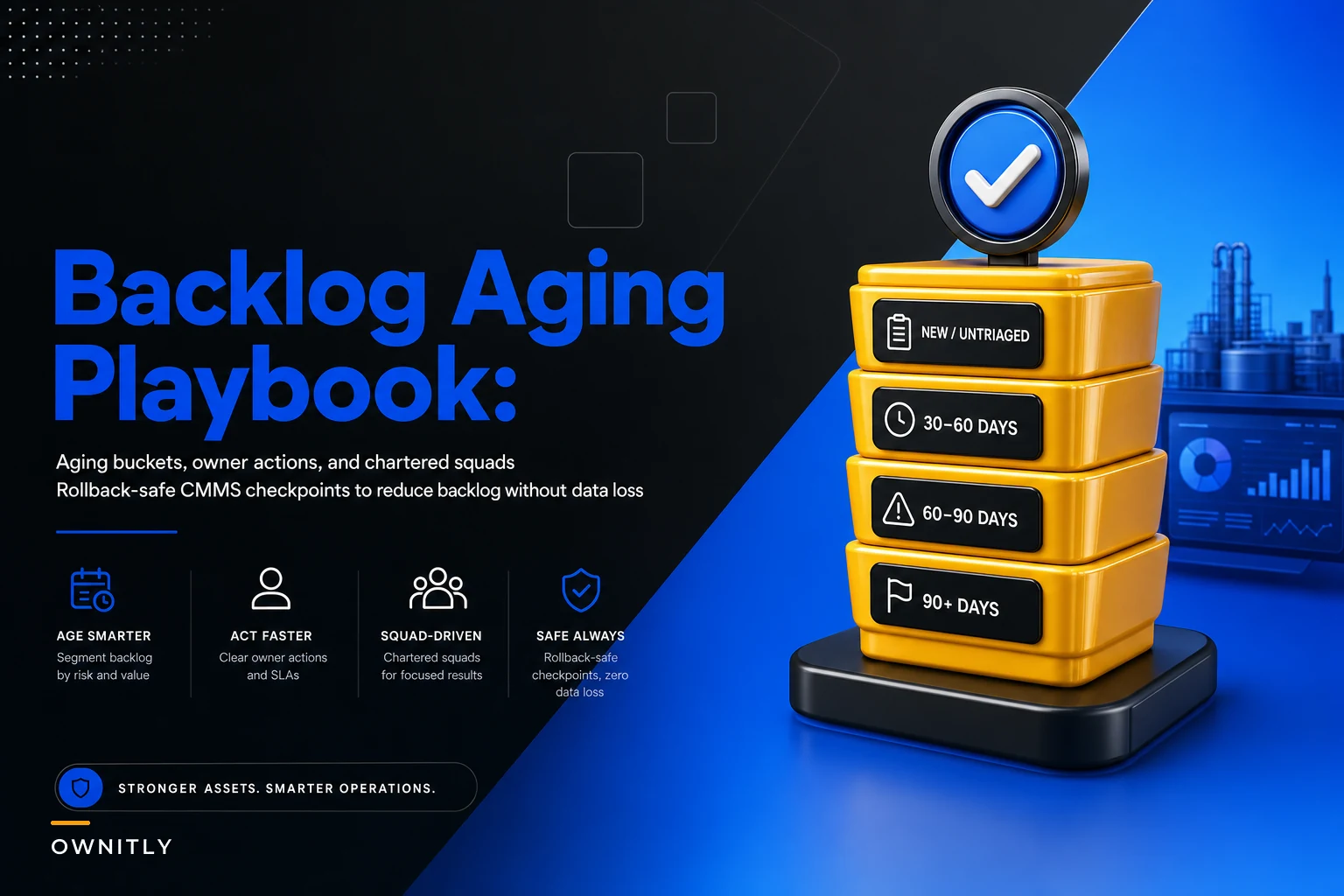
Generic aging reports showing "30-60-90 days old" accomplish nothing. You need aging buckets tied to specific operational realities and clear ownership. Here's what works across different maintenance environments:
Stop losing track of critical assets.
Ownitly helps you monitor, maintain, and manage every asset efficiently and reliably.
- Centralized asset tracking
- Automated maintenance alerts
- Compliance monitoring & reporting
No credit card required
0–14 days: Active execution window Owner: Maintenance supervisor Action: Daily review at shift meetings Threshold breach: Escalate to maintenance manager if more than 20% remain unassigned after 7 days
15–30 days: Planning verification zone Owner: Maintenance planner Action: Validate scope, parts availability, resource requirements Threshold breach: Flag if parts ordered but not received, triggering procurement review
31–60 days: Operational relevance check Owner: Operations coordinator + maintenance planner Action: Joint review for continued validity Threshold breach: Auto-flag for criticality reassessment if production context has changed
61–90 days: Management intervention required Owner: Maintenance manager Action: Document reason for delay, get written approval to continue or cancel Threshold breach: Escalate to plant manager if more than 5% of total backlog falls here
91–180 days: Chartered squad territory Owner: Cross-functional team (see squad structure below) Action: Full investigation and disposition Threshold breach: Requires VP approval to keep the order in the system
180+ days: Executive review mandatory Owner: Site leadership team Action: Formal presentation on why the order remains open Threshold breach: Automatic cancellation unless safety or regulatory impact is documented
The power comes from tying each bucket to specific people and specific actions. Not "review regularly" — but "Bob reviews every Tuesday at 2pm during the shift meeting and makes three decisions: execute this week, push to next week with a reason, or cancel with documentation." Vague ownership is how backlogs keep aging.
Chartered short-term squads: Your backlog SWAT teams
Permanent committees fail at backlog reduction. They meet weekly, revisit the same issues, and the backlog barely moves. Chartered short-term squads work because they have a narrow focus, defined authority, and an expiration date.
Squad composition:
-
1 maintenance technician (knows the actual work)
-
1 operations representative (understands current needs)
-
1 planner (sees the full picture)
-
1 junior engineer (brings fresh perspective, handles documentation)
-
1 finance representative (for orders over $10K)
Charter parameters:
-
Duration
30 days maximum
-
Authority
Can close or cancel orders up to $25K without additional approval
-
Meeting cadence
Daily 30-minute standups for the first week, then twice weekly
-
Success metric
Minimum disposition rate of 25 orders per day
Squad working rules:
-
Physical verification required for equipment status — no desk decisions
-
Three-option framework for every order
execute immediately, replan with a new date, or cancel with a reason code
-
Bulk cancellation allowed only for verified categories (duplicate, equipment retired, scope absorbed into a larger project)
-
Every cancellation requires a lesson learned entry
A paper mill in Wisconsin ran four consecutive 30-day squads, each targeting a different aging bracket. Squad 1 handled 180-plus day orders, Squad 2 took 120–180 days, and so on. Result: 2,134 aged orders reduced to 287 valid work items. More importantly, they surfaced systemic issues — their PM generation was creating duplicates, their work order closure process had a training gap, and their priority system meant "low priority" effectively meant "never do."
Rollback-safe CMMS changes that protect your data
The worst backlog cleanup disasters happen when someone mass-deletes or bulk-updates without thinking through reversal. Your CMMS becomes a crime scene where nobody knows what changed or how to undo it.
Before touching any aged work order, you need three protection layers.
Layer 1: Pre-cleanup snapshot Export everything to a timestamped CSV before making changes. Not just work order numbers — export all fields including custom fields, notes, and status history. Store in three places: network drive, cloud backup, and email to yourself. Sounds paranoid until you actually need it.
Layer 2: Staging environment testing Never run bulk operations in production first. Clone your environment or use a test instance. Run your cleanup scripts there and check for cascade effects — does canceling a work order affect related PMs? Does it trigger procurement cancellations? Does it distort your KPI calculations?
Layer 3: Incremental execution with checkpoints Don't process 1,000 orders at once. Run in batches of 50 with verification between each batch. Create restore points after each successful batch. Document what changed in a cleanup log with timestamps, user ID, and business justification.
A rollback procedure that actually works in practice looks something like this:
Cleanup Operation: Cancel all PMs for retired equipment Pre-execution checklist: □ Full database backup completed □ Affected orders exported to CSV □ Test run on 5 orders in staging □ Rollback script tested successfully □ Operations manager approval documented Execution batches: Batch 1 (Orders 1-50): Complete, verified, checkpoint created Batch 2 (Orders 51-100): Complete, verified, checkpoint created [Error detected in Batch 3 - duplicate asset IDs] Rollback to Batch 2 checkpoint executed Root cause: Asset naming convention change missed Corrective action: Update selection criteria Resume from Batch 3 with corrected logic
Here's a simple visual of the rollback-safe cleanup workflow.
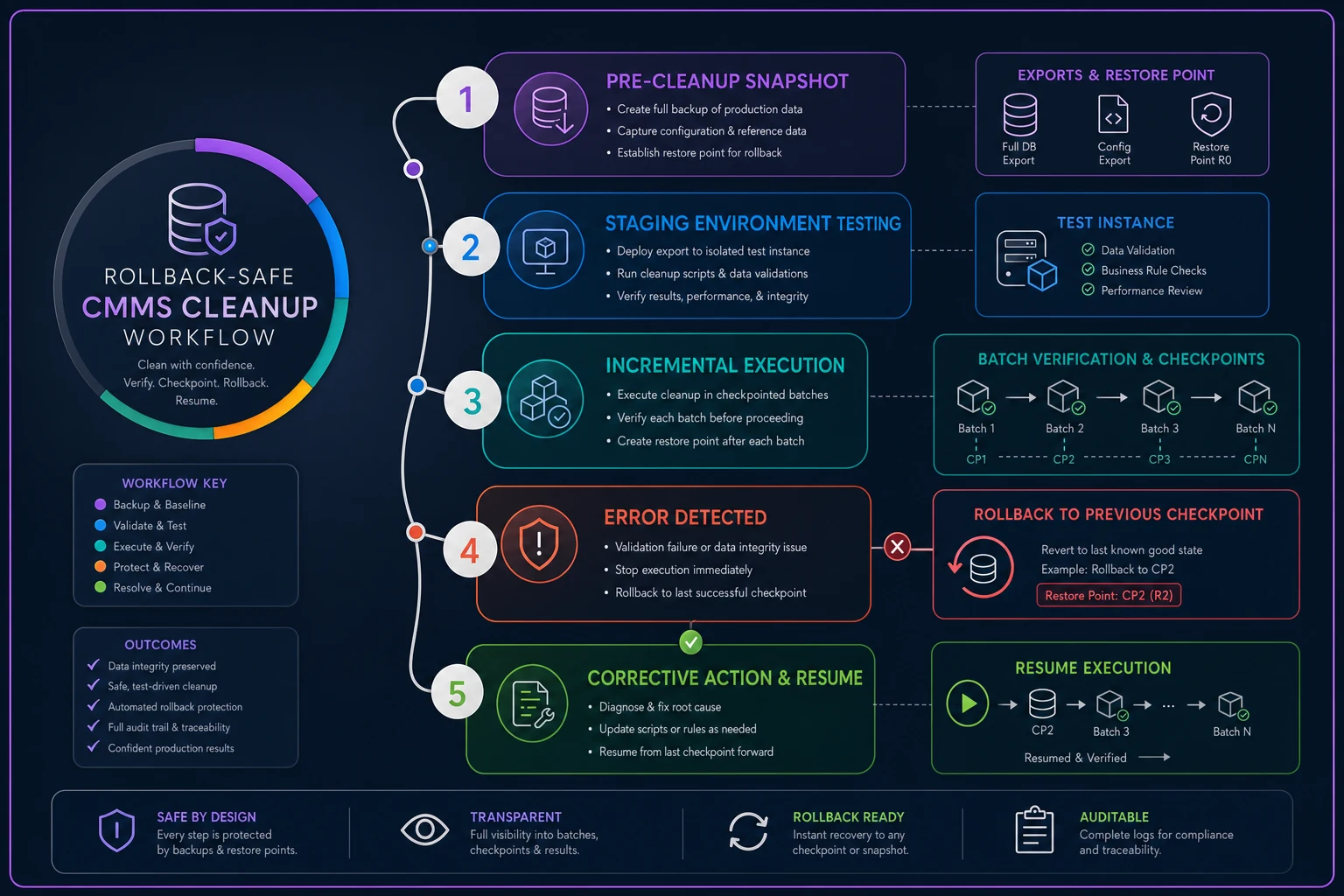
The checkpoints feel like extra work until you hit a mid-batch error and can restore cleanly instead of manually reconstructing what changed.
The inspection connection you're probably missing
Aged work orders often hide a bigger problem: inspection backlogs feeding bad data into maintenance planning. Your RBI scoring system for critical assets might be generating work orders based on inspection findings from eight months ago. By the time maintenance gets to them, the underlying condition has either progressed to failure or been resolved through other work.
The feedback loop breaks when inspections generate work orders that sit indefinitely. Inspectors stop bothering with detailed findings, and maintenance stops trusting anything that comes from inspection routes. One manufacturing site found that roughly 43% of their aged work orders came from inspection routes that hadn't been validated in over a year.
Master data cleanup: The foundation for preventing future aging
Most backlog aging traces back to master data problems that compound over time. Duplicate asset records generate duplicate PMs. Incorrect criticality rankings bury important work under low-priority noise. Missing parent-child relationships mean you're maintaining components on equipment that was decommissioned months ago.
The three-phase master data cleanup approach becomes essential before any serious backlog reduction effort. Clean asset hierarchies prevent work order duplication. Accurate failure codes enable better prioritization. Validated PM templates stop generating work orders that were never going to get done anyway.
These aren't optional cleanup steps — they're the reason backlogs come back after every campaign. Fix the master data, and the volume of junk entering the system drops significantly.
Measuring success: Metrics that actually matter
Tracking "backlog reduction percentage" tells you almost nothing useful. You need metrics that reflect actual operational improvement.
| Metric Category | Metric | Target Direction |
|---|---|---|
| Leading Indicators | Average age at work order completion | Decreasing |
| Leading Indicators | Orders closed within planned timeframe | Increasing |
| Leading Indicators | Work orders created vs. completed ratio | Approaching 1:1 |
| Quality Metrics | Reopened work order rate | Below 3% |
| Quality Metrics | Emergency work percentage | Decreasing |
| Quality Metrics | PM compliance rate | Increasing |
| Engagement Metrics | Work orders submitted by operations | Increasing |
| Engagement Metrics | Technician work order acceptance rate | Increasing |
| Engagement Metrics | Time from submission to assignment | Decreasing |
A food processing plant tracked these through their backlog reduction program. Starting point: average age at completion was 67 days, emergency work sat at 34%, PM compliance at 61%. After three months of systematic aging management, average age dropped to 22 days, emergency work fell to 19%, and PM compliance reached 84%. The numbers don't lie — but you have to track the right ones.
Where technology fits into the picture
Manual backlog review burns through technician time on work that shouldn't require that level of human attention. Modern operational platforms use AI automation to handle repetitive analysis while people make the actual decisions. Pattern recognition flags duplicate work orders automatically. Natural language processing pulls key details from work order descriptions and surfaces consolidation opportunities. Predictive analytics help separate aged orders that represent ongoing issues from ones that are just stale noise.
The real value isn't the algorithms — it's getting your maintenance team out of spreadsheets and back to fixing equipment. An automated aging analysis that runs daily, flags exceptions, and routes items to the right owner beats a monthly manual review that chews through two full days to complete. These platforms also prevent future aging by catching problems before they compound. Work orders sitting unassigned past 48 hours trigger notifications. Parts delays escalate to procurement automatically. Changes in equipment criticality prompt work order reprioritization. The backlog stays cleaner because issues get touched before they drift into irrelevance.
Making the backlog aging playbook stick
One-time cleanup campaigns don't fix backlog aging. The problem comes back. You need processes that become part of daily operations.
Start with one aging bucket — usually the 90-plus day category since it's the most visible problem. Run one chartered squad for 30 days. Document what you learn. Then expand.
The organizations that actually sustain backlog management share three things: clear ownership at each aging threshold, real authority for the people doing the reviews, and a mindset that treats aged work orders as operational failures worth investigating — not just numbers to bring down. Chasing the number without understanding what's driving it is how you end up with a cleaner-looking backlog that's just as dysfunctional underneath.
Your maintenance team wants to do good work. Operations wants reliable equipment. Management wants predictable performance. Aged backlogs undermine all three. Start with your worst aging bucket, charter a squad, give them real authority, and make decisions instead of pushing dates forward again.
Ready to elevate your asset operations?
Join 1,500+ businesses using Ownitly to optimize asset utilization, reduce downtime, and ensure compliance.