



Most predictive maintenance programs don't fail because the models are bad. They fail because someone flipped a model on, it generated 180 alerts in the first week, 150 of those were noise, and by day four the reliability team had stopped opening the dashboard. The algorithm was technically right a decent chunk of the time. Didn't matter. Trust was gone.
That's the actual problem with pushing predictive alerts straight into your EAM. You're not just deploying a model — you're injecting a new source of work into a system people already depend on. If that injection is sloppy, you contaminate the triage queue, blow the backlog math, and teach planners to ignore the exact signals you spent six months building.
A canary deployment predictive maintenance approach borrows from how software teams ship risky code: expose the new behavior to a small, controlled slice first, watch it against pre-agreed numbers, and keep a clean path to roll it back if things go sideways. In EAM, your "users" are assets, planners, and technicians — and your rollback isn't a code revert, it's a decision about whether a stream of alerts gets to create real work orders or not.
This article is about the operational system around that rollout. Not the model math — the plumbing that decides whether a predictive signal earns the right to generate a work order.
Why straight-to-production alerting breaks at scale
The failure pattern is pretty consistent and has almost nothing to do with model accuracy in isolation.
When you connect a predictive model directly to automatic work-order generation, you've built a pipeline with no shock absorber. Every false positive becomes a work order someone has to open, read, judge, and close. Every missed true positive becomes a failure that happened while the dashboard said "healthy." Both erode confidence, but false positives erode it faster because they're visible, annoying, and compete for technician hours you don't have.
The part people underestimate: a model that performs fine in a backtest against one asset class will behave completely differently when it meets your actual fleet. This usually happens when the model was tuned on well-instrumented pumps and then gets pointed at the half of the fleet with intermittent sensor dropouts, inconsistent naming, and three different firmware versions on the same vibration sensor. The model doesn't know the data is garbage. It just emits confident alerts.
What breaks at scale isn't one model. It's the coordination between:
-
the model that emits a signal,
-
the mapping logic that decides whether that signal becomes a work order,
-
the triage team that has to absorb the new volume,
-
and the backlog, which quietly inflates until someone notices the aged work-order count doubled.
You can't fix that by making the model better. You fix it by controlling how much of reality the model is allowed to touch at any given time. That's what the pilot patterns below are actually for.
Three pilot patterns: shadow, canary, cohort
Think of these as three dials, not three options. Most mature programs run all three in sequence, and sometimes simultaneously across different asset groups.
Stop losing track of critical assets.
Ownitly helps you monitor, maintain, and manage every asset efficiently and reliably.
- Centralized asset tracking
- Automated maintenance alerts
- Compliance monitoring & reporting
No credit card required
| Pattern | What the model does | Work orders created? | Who sees it | Best for |
|---|---|---|---|---|
| Shadow | Runs live, logs predictions, compares to reality | No — predictions logged only | Reliability engineers only | Validating a brand-new model against live data before anyone trusts it |
| Canary | Runs live on a small asset slice, generates real alerts | Yes, but limited to a small, reversible cohort | Planners + technicians for that slice | Testing the full alert→work-order loop with real people in the loop |
| Cohort rollout | Expands to defined asset groups in stages | Yes, scaling across groups | Whole maintenance org, progressively | Scaling a proven model without a big-bang risk |
Shadow mode: earn the right to generate anything
In shadow mode the model runs against production data but every prediction goes into a log, not the CMMS. Nobody gets a work order. You're building a track record.
The practical value here is boring and essential: you get to compare what the model would have done against what actually happened. If the model would have flagged 40 assets last month and only 6 had real degradation, you know your false-positive rate before you've annoyed a single planner.
A common mistake is skipping this phase because "we already backtested it." Backtests use clean historical data. Shadow mode uses live, dropout-ridden, real-time data — and that's where models embarrass themselves.
Canary: the first real work orders
Canary is where it gets uncomfortable, because now the model creates actual work orders — but only for a tightly bounded slice of assets. Maybe 15 to 25 non-critical assets at one site. If the model misbehaves, the blast radius is small and you can turn it off in minutes.
The canary slice should be chosen carefully. Don't pick your worst-instrumented assets (you'll get noise and blame the model) and don't pick your most critical ones (you can't afford the risk). Pick representative, moderately-instrumented, non-critical assets where a false positive costs a wasted inspection, not a shutdown.
Cohort rollout: scaling without a cliff
Once canary numbers hold, you expand in cohorts — asset groups defined by type, site, instrumentation quality, or criticality. Each cohort crosses the same acceptance gate before the next one opens. This is the same staged logic described in a continuous-improvement cadence for maintenance, applied to deployment rather than process tuning: small controlled expansions, each measured before the next.
Acceptance KPIs: the numbers that decide promotion
A model doesn't get promoted from one stage to the next because people feel good about it. It gets promoted because it hit pre-agreed numbers. Decide the thresholds before the pilot starts, in writing, so nobody renegotiates them emotionally when the model is halfway decent.
The KPIs that actually matter for an alert→work-order pipeline:
-
Precision on actionable alerts — of the work orders the model generated, what fraction led to a genuine maintenance action? Below roughly 50–60% early on, you're training people to ignore alerts.
-
Lead time captured — how far ahead of functional failure did the alert fire? An alert that fires two hours before failure is technically a true positive and operationally useless.
-
Noise rate per asset per week — the single best predictor of whether planners will keep trusting the stream. Even a few nuisance alerts per asset per week will burn goodwill fast.
-
Triage absorption — did the new alert volume push your triage SLA or aged work-order count? A model can be accurate and still break your operation if it doubles the planner's reading load.
-
False-negative visibility — failures that occurred with no alert. Hardest to measure, most important for critical assets.
Two of those are about the model and three are about the operation around it. That ratio is deliberate. A predictive program is a workflow problem wearing a data-science costume.
For context on how threshold choices directly change alert volume and quality, the mechanics in predictive vibration threshold tuning for rotating equipment are worth reading alongside this — tuning sensitivity is exactly the lever that moves your precision and noise numbers during a canary.
When a KPI is telling you to stop
If precision is fine but triage absorption is failing, the model isn't the problem — your mapping logic is too generous and you're converting too many low-confidence signals into work orders. If precision is bad, the model needs tuning before it goes any wider. Separating these two is the whole game. People conflate them constantly and end up retraining models that were never the issue.
Rollback checkpoints: making "turn it off" a non-event
The biggest reason teams hesitate to pilot aggressively is fear that they can't cleanly undo it. So they over-deliberate, delay, and eventually do a timid rollout that proves nothing. The fix is making rollback a pre-planned, low-drama checkpoint rather than an emergency.
A rollback checkpoint is a defined moment where you look at the acceptance KPIs and make one of three calls: promote, hold, or revert. Build these into the deployment on a fixed cadence — end of week one, end of week two, end of week four — not "whenever someone gets nervous."
-
Alert generation is feature-flagged per cohort. You can disable work-order creation for one asset group without touching the rest.
-
Already-created work orders are tagged with their source model and version. When you revert, you know exactly which open work orders came from the model and can decide whether to keep, reclassify, or cancel them.
-
A documented "revert state." Everyone knows what the system looks like after rollback — which assets go back to time-based PMs, which alerts go back to shadow-only.
-
A recorded reason. You revert for a reason, and that reason becomes the next experiment. A rollback that isn't documented is just a quiet failure.
Treat a documented rollback reason as the starting hypothesis for the next canary rather than as a failure.
Teams that do this well treat a rollback as information, not defeat. Reverting a cohort because noise rate was too high isn't a setback — it's a tuned input for the next canary.
Mapping alerts to work orders: where most of the real work lives
This part gets almost no attention and causes most of the operational pain. A predictive alert is not a work order. The translation layer between them is where you decide severity, priority, assignment, and — critically — what evidence travels with the generated work order.
A workable mapping workflow
[Model emits scored signal] ↓ [Confidence gate check] Below threshold → logged only (shadow) Above threshold → continue ↓ [Asset criticality lookup] Assigns priority tier ↓ [Evidence template populated] Signal history, threshold crossed, probable failure mode, recommended action ↓ [Work order generated] Tagged with model version + confidence score ↓ [Technician feedback field] Confirm / reject → feeds precision KPI
The model emits a scored signal. The mapping layer first checks a confidence gate — below a threshold, the signal is logged but doesn't create a work order. Above the gate, it checks asset criticality to assign priority, so a mid-confidence alert on a critical asset can outrank a high-confidence alert on a spare. Then it attaches an evidence template — a pre-built package of the signal history, the threshold that was crossed, the probable failure mode, and the recommended first action. Only then does it generate the work order, tagged with the model version and the confidence score so triage can judge it.
Below is a visual of the mapping workflow.
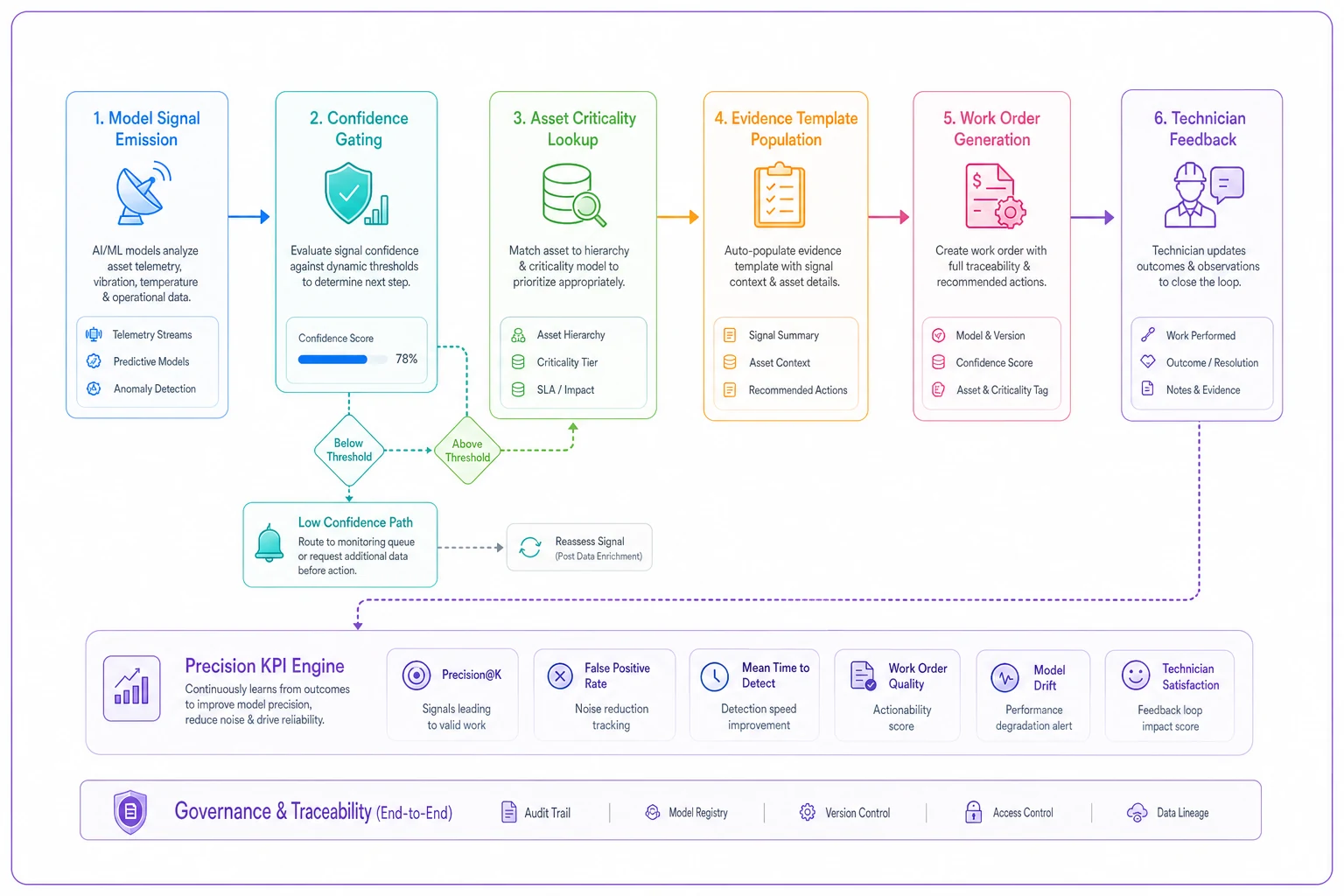
That evidence template is the difference between a technician trusting the alert and rolling their eyes at it. If the generated work order says "vibration trend exceeded baseline by 2.3x over 72 hours, probable bearing wear, recommend inspection of drive-end bearing," you've handed the technician a reason to act. If it just says "predictive alert — inspect," you've handed them homework.
The evidence template checklist
-
The asset ID and location, resolved to names humans actually use
-
The model and version that fired, plus the confidence/anomaly score
-
The signal evidence — the trend, the window, the threshold crossed, ideally a small chart
-
The probable failure mode in plain language
-
The recommended first action, not just "inspect"
-
The priority rationale — why this ranks where it ranks in the queue
-
A feedback field for the technician to confirm or reject, which feeds your precision KPI
That last point is quietly the most important. Without a structured confirm/reject coming back from the field, you can't calculate real precision and your acceptance KPIs are guesses. Most teams skip the feedback field because it feels like extra work during setup, then spend months wondering why their precision numbers don't match what planners are telling them anecdotally.
A real scenario: canary on a water utility pump fleet
A mid-sized water utility had vibration and current sensors across roughly 60 pumps and a predictive model their vendor was pushing them to switch on fleet-wide. The reliability lead resisted the big-bang and ran it in stages instead.
Shadow mode, first three weeks: the model logged predictions against live data. It would have generated around 44 work orders. Reviewed against what actually happened, only about a third pointed at real degradation. Fleet-wide, that would have been a flood of noise. Shadow mode caught it before anyone was annoyed.
Tuning, then canary: they raised the confidence gate and added an asset-criticality rule to the mapping layer, then ran a canary on 18 non-critical pumps at one station. Real work orders now, but a small slice. Over four weeks the canary generated roughly 11 work orders; 7 led to genuine action, and the noise rate dropped to something planners could live with. Precision landed in the low 60s — not spectacular, but trustworthy enough to expand.
Cohort rollout: they expanded in two cohorts over the next couple of months, each crossing the same acceptance gate before the next opened. One cohort got held at the week-two checkpoint because noise spiked on a group of pumps with flaky sensors — which turned out to be a data problem, not a model problem. They fixed the instrumentation, re-canaried that group, and moved on.
The outcome wasn't a dramatic uptime miracle. Planners actually trusted the predictive queue, nuisance alerts stayed low, and the aged-work-order count didn't balloon because the rollout never dumped volume the triage team couldn't absorb. The whole thing took about four months instead of the "flip it on Monday" the vendor wanted.
When this approach makes sense — and when it doesn't
When staged canary rollout is worth it:
-
You have more than a handful of instrumented assets and real consequences for both false positives and misses
-
Your triage and backlog are already near capacity and can't absorb an alert flood
-
You're deploying a model you haven't run against your live, messy data yet
When it's overkill:
-
You've got a tiny fleet of a few critical assets where a reliability engineer reviews every signal by hand anyway — the ceremony of cohorts and checkpoints just slows you down
-
The model only emits a handful of alerts a month across the whole fleet — there's nothing to canary
Who should not do this yet:
If your asset master data is a mess — duplicate records, inconsistent naming, unmapped locations — don't start a canary. The mapping layer will produce garbage work orders no matter how good the model is, and you'll blame the wrong thing. Clean the foundation first. A predictive rollout sitting on bad master data fails in ways that look like model failure but aren't.
Bringing it together
The instinct with predictive maintenance is to treat the model as the product. It isn't. The product is the system that decides whether a signal earns the right to become real work — and that system lives in the gap between the model and the CMMS, in the mapping logic, the acceptance numbers, and the rollback discipline.
Shadow proves the model against reality without risk. Canary tests the full human loop on a slice you can turn off in minutes. Cohort rollout scales it without a cliff. Acceptance KPIs decide promotion on numbers, not feelings. Rollback checkpoints make "turn it off" routine instead of traumatic. And the evidence template is what makes a technician trust the alert instead of filing it under "things I'll get to eventually."
Do those pieces well and predictive alerts stop being a source of noise and start being a source of lead time. Do them badly and you'll have a technically accurate model that everyone learned to tune out by week two — which is the most expensive kind of failure, because it looks like it's working right up until you realize nobody's looking at it anymore.
Ready to elevate your asset operations?
Join 1,500+ businesses using Ownitly to optimize asset utilization, reduce downtime, and ensure compliance.