

Most fixed asset management software fails evaluation not because of what it can't do, but because of what it assumes about the systems around it. You buy a tool that depreciates beautifully, tags assets neatly, spits out clean rollforwards — and six months in you discover it can't reconcile against your EAM asset hierarchy without a nightly CSV export that breaks every time someone renames a cost center.
The hard part of choosing fixed asset management software in an EAM + ERP environment isn't the feature list. It's the seams. The places where asset numbers, depreciation books, work-order capitalizations, and physical inventory counts have to agree across three systems that were never designed to agree. This checklist is organized around those seams — what to test, what to write into your RFP, and how to score vendors before you fall in love with a demo.
Start with the data model, because everything downstream inherits its flaws
The single most expensive mistake buyers make is evaluating depreciation and reporting first, then checking data model compatibility last. It should be the reverse. If the FAM tool's concept of an "asset" doesn't line up with how your EAM defines a functional location, equipment record, or asset BOM, you will spend the rest of the system's life bridging that gap manually.
Here's where the mismatch usually shows up. In EAM, a pump might be one equipment record with a parent functional location and several maintainable sub-components. In ERP, the same pump might be one capitalized asset. In the FAM tool, it might need to be three depreciable components with different useful lives — the motor, the housing, the controller — because tax rules treat them differently. If your FAM software only supports a flat one-asset-to-one-record model, you've already lost component depreciation and you'll be forced into clumsy workarounds.
-
Does the data model support parent/child asset relationships and component-level depreciation under a single tag?
-
Can it store both the EAM equipment ID and the ERP asset number as first-class fields, not stuffed into a "notes" box?
-
Does it support multiple asset identifiers (serial, barcode, RFID, legacy ID) without forcing one as the primary key?
-
Can an asset carry multiple cost dimensions (cost center, location, project, GL account) and keep them in sync when any one changes?
A typical example: a mid-sized utility runs around 12,000 equipment records in their EAM but only around 4,500 capitalized assets in finance. The FAM tool needs to map many EAM records to one capital asset and support splitting one capital asset into multiple depreciation components. Tools that can only do 1:1 mapping get eliminated here — and it's better to find that out in week one than month nine.
Depreciation depth: the demo always looks fine, the edge cases don't
Every vendor demos straight-line depreciation on a clean asset. That tells you nothing. The questions that separate serious FAM software from glorified spreadsheets live in the edge cases.
Stop losing track of critical assets.
Ownitly helps you monitor, maintain, and manage every asset efficiently and reliably.
- Centralized asset tracking
- Automated maintenance alerts
- Compliance monitoring & reporting
No credit card required
-
A partial disposal — retiring 30% of a component asset mid-year and watching the gain/loss calculation plus the adjusted depreciation base.
-
A mid-life transfer between cost centers or legal entities, and whether accumulated depreciation follows correctly.
-
Multiple depreciation books running in parallel (tax, GAAP/IFRS, internal management) on the same asset with different methods and conventions.
-
A retroactive useful-life change and how the catch-up adjustment is booked.
-
Impairment and subsequent reversal handling.
Tools that handle books 1 and 3 easily often fall apart on retroactive changes, quietly recalculating prior periods without an audit trail. That's the kind of thing you don't catch until an auditor asks why last year's depreciation changed.
When your asset decisions tie back to CAPEX planning and ESG commitments, depreciation accuracy stops being a finance-only concern — it feeds the numbers that justify reinvestment. If you're building that linkage, it's worth revisiting how asset portfolios map to risk, CAPEX, and ESG goals so the FAM data model actually supports portfolio-level reporting rather than fighting it.
The audit trail is a buying criterion, not a feature
Treat the audit trail as a top-three decision factor, equal to depreciation. A FAM tool sitting between EAM and ERP becomes the system of record for capital asset changes — which means it becomes an evidence source the moment anyone questions a number.
-
Immutable, timestamped change logs at the field level — who changed the useful life, from what to what, when, and ideally why.
-
Audit entries that survive data migrations and version upgrades (ask specifically; many don't).
-
The ability to reconstruct an asset's full state on any given past date, not just show the current value.
-
Export of audit evidence in a format your external auditors will accept without a custom extract.
A quiet red flag: vendors who describe their audit trail as "available in the reporting module." Reporting is derived data. You want the underlying log. If the audit trail can be edited, truncated, or regenerated, it isn't defensible. The standards for what makes maintenance and asset records hold up under scrutiny are covered in more depth in this breakdown of legal defensibility for maintenance records and e-discovery policies, and the same logic applies directly to capital asset records.
Tagging and physical inventory: where the register meets reality
Depreciation math is only as honest as the physical existence of the asset. The FAM tool has to support the field reality of someone walking a plant floor with a scanner, finding assets that aren't in the register, and finding register entries with no physical asset behind them.
-
Support for mobile scanning (barcode/RFID/QR) with offline capture for areas with no signal.
-
A structured reconciliation workflow
found-not-in-register, in-register-not-found, moved, and condition-changed, each with a disposition path.
-
The ability to attach photo evidence and GPS/location metadata to a count.
-
Bulk handling for the inevitable — a new acquisition brings in 400 assets at once and they all need tagging and first-count in a session.
A realistic scenario: a manufacturer running their first full physical inventory in four years finds roughly 8% of capitalized assets are ghost assets — on the books, depreciating, but physically gone. At their asset base that's a meaningful writedown, but also a recurring overstatement they'd been carrying for years. A FAM tool with a weak inventory workflow lets ghost assets accumulate silently between counts.
Integration test cases: write these into your evaluation, not after it
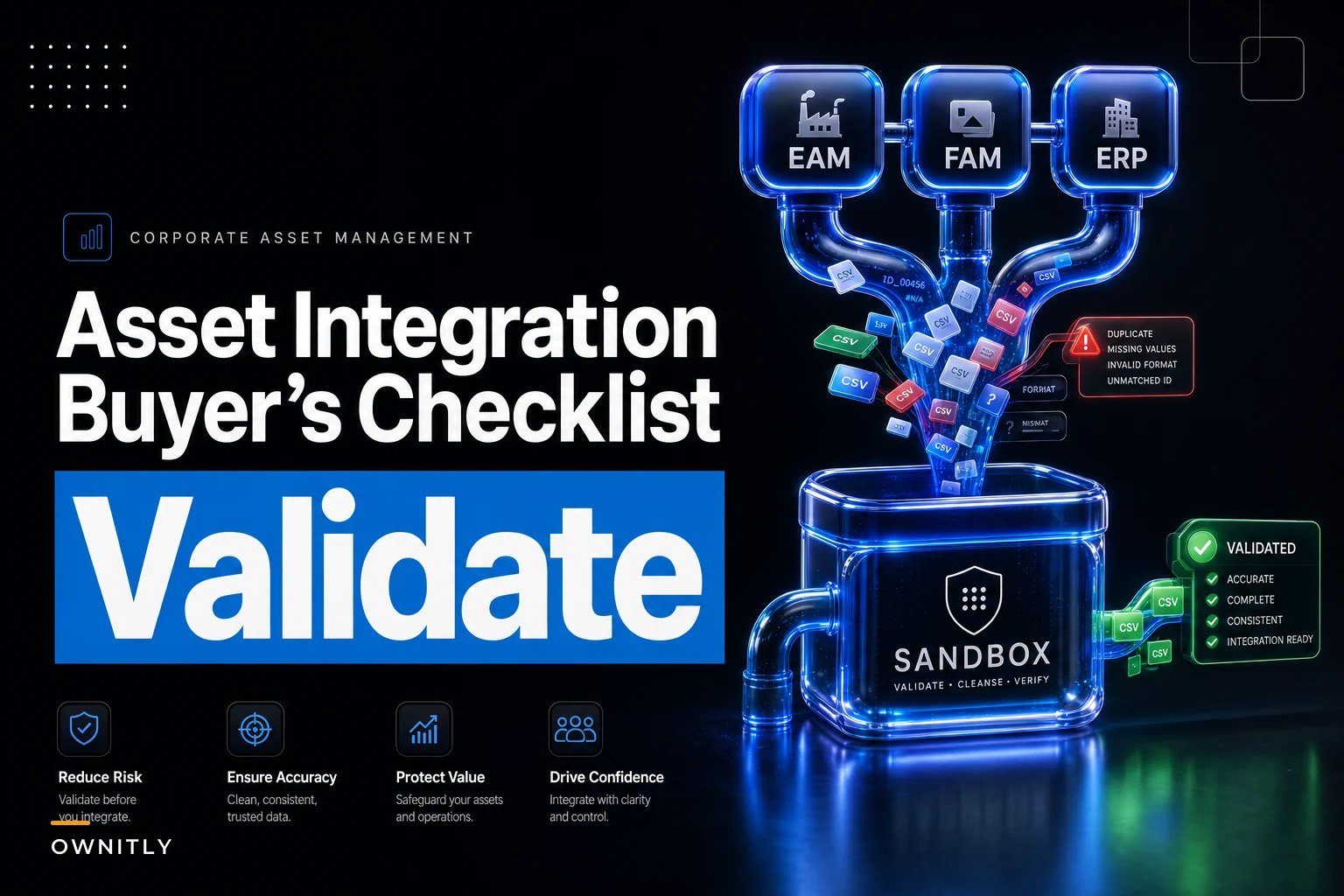
Don't accept "yes, we integrate with SAP" as an answer. Integration claims are cheap. Build a small set of concrete test cases and require vendors to demonstrate them in a sandbox against sample data you provide. Below is a starter set.
| Test case | What it proves | Pass criteria |
|---|---|---|
| EAM equipment create → FAM asset shell | New equipment flows in with hierarchy intact | Asset appears with parent/location, no manual re-key |
| Work-order capitalization → FAM cost add | CAPEX from a completed WO lands on the right asset | Cost posts to correct component, with WO reference preserved |
| FAM depreciation run → ERP GL post | Period close posts clean journal entries | Entries match by cost center/GL, no suspense balances |
| Asset transfer in ERP → FAM + EAM sync | Location/cost center change propagates | All three systems agree within the sync window |
| Disposal in FAM → EAM decommission + ERP retire | Retirement is consistent everywhere | No orphaned equipment record, gain/loss booked once |
| Master data change (cost center rename) | Change doesn't break mappings | Existing assets re-point automatically |
Run these with deliberately messy data — duplicate serials, a missing cost center, an asset with no parent. The point isn't to see the happy path. It's to see how the integration fails, because it will fail, and you need to know whether it fails loudly (rejected record, clear error) or silently (wrong GL, no warning). Silent failure is the one that ends up in a restatement.
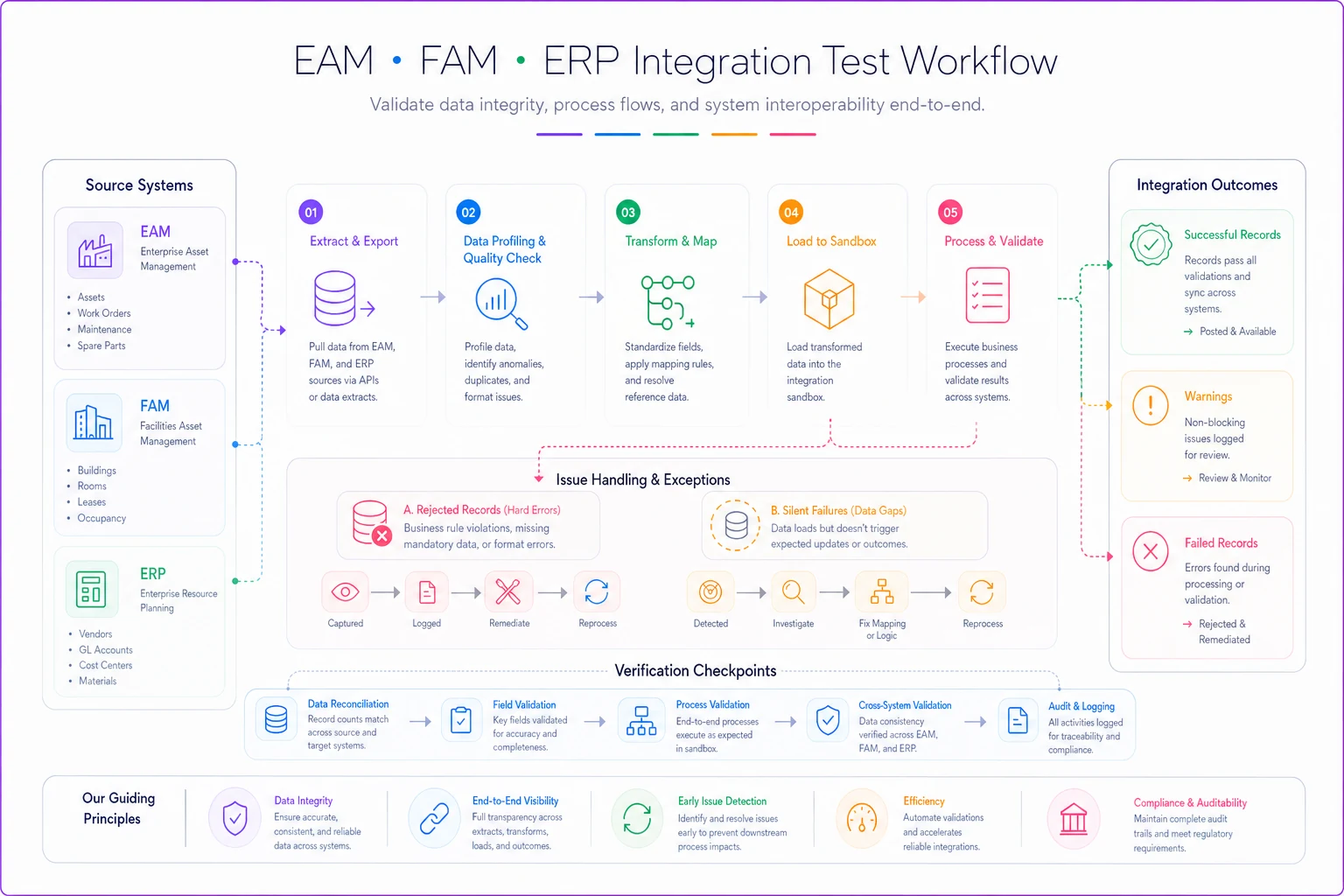
A simple visual of the sandbox test workflow helps the evaluation committee and implementation team agree on expected failure modes and acceptance criteria.
Data-mapping checklist before you sign anything
Before contract, before migration, map every field that has to cross a system boundary. This is tedious and it's the step most teams skip, then regret.
-
[ ] Primary asset key in each system and the crosswalk between them
-
[ ] Cost center / GL account mapping (and who owns changes to it)
-
[ ] Asset class / category taxonomy alignment across FAM, EAM, ERP
-
[ ] Useful life and depreciation method source of truth — which system decides
-
[ ] Location / functional location hierarchy mapping
-
[ ] Acquisition cost vs. capitalized cost definitions (they differ more than people expect)
-
[ ] Disposal/retirement status values and how they translate
-
[ ] Currency and entity structure for multi-entity organizations
-
[ ] Sync direction and frequency for each field (one-way, two-way, event-driven)
Decide and lock the source of truth for useful life before migration to prevent drift across systems.
The field most commonly fumbled: source of truth for useful life. When EAM, FAM, and ERP each think they own it, you get drift. Decide explicitly — usually FAM owns depreciation parameters, EAM owns physical and maintenance attributes — and write it down before go-live.
Governance and ownership: who owns the asset record when three teams touch it
Software doesn't fix an ownership vacuum. If finance, maintenance, and procurement all edit asset data with no agreed roles, your clean register degrades within a quarter. Define these roles explicitly in the RFP and the implementation plan:
-
Asset data owner (finance) depreciation books, capitalization decisions, disposals.
-
Equipment data owner (maintenance/EAM) physical attributes, location, condition, the equipment hierarchy.
-
Procurement/AP acquisition cost, PO linkage, initial capitalization trigger.
-
Data steward resolves conflicts, approves master data changes, runs periodic reconciliation.
A simple governance rule that prevents most problems: no field has two owners. Every attribute gets exactly one accountable role, even if multiple roles can view it. The reconciliation cadence — monthly between EAM and FAM, each close between FAM and ERP — should be a named responsibility, not an "when we get to it" task.
Because asset data in regulated environments also carries security and evidence obligations, align your FAM governance with your broader control framework. The approach in EAM OT/IT security and evidence controls for regulated industries translates well to who gets write access to the capital register and how those changes are logged.
Sample RFP clauses you can adapt
Vague RFPs get vague answers. Specific language forces vendors to either commit or disclose limitations — both outcomes are useful. These clauses are adapted from real evaluations and can be dropped into most procurement templates with minor edits.
-
- "Vendor shall support component-level depreciation under a single parent asset tag, with each component carrying independent useful life, method, and in-service date."
-
- "System shall maintain an immutable, field-level audit log capturing user, timestamp, prior value, and new value, retained for no less than [X] years and exportable in [format] without vendor assistance."
-
- "Vendor shall demonstrate, in a sandbox using buyer-supplied sample data, bidirectional synchronization of asset master data between the FAM system and [EAM] and [ERP], including handling of rejected records with documented error reporting."
-
- "System shall support at minimum [N] concurrent depreciation books with independent methods and conventions on the same asset."
-
- "Vendor shall provide a documented data dictionary and field-level integration specification prior to contract execution."
That last one matters more than it looks. A vendor who can't hand you a field-level integration spec before signing is a vendor who hasn't thought hard about integration — and you'll pay for that gap during implementation.
Red flags worth walking away over
The demo only ever shows clean, single-asset straight-line depreciation and the rep deflects edge-case questions.
-
"Integration" turns out to mean scheduled CSV import/export, not an API or event-driven sync.
-
The audit trail lives in reporting, can be edited, or doesn't survive upgrades.
-
No native support for multiple asset identifiers — you'd lose your EAM and legacy IDs.
-
Physical inventory is an add-on module with a separate price and a different data model.
-
The vendor can't name a reference customer running the same EAM + ERP combination you have.
-
Pricing is per-asset in a way that punishes you for cleaning up ghost assets (yes, this happens).
Any one of these isn't automatically fatal. Two or more together usually is.
A lightweight scoring matrix for short-listing
Keep scoring simple enough that the whole committee actually fills it in. Weight the categories by your risk, but a reasonable default for an EAM + ERP environment looks like this:
| Category | Weight | Score 1–5 | Weighted |
|---|---|---|---|
| Data model fit (hierarchy, multi-ID, components) | 25% | ||
| Depreciation depth (books, edge cases, retro changes) | 20% | ||
| Integration (API, sync direction, failure handling) | 20% | ||
| Audit trail & compliance | 15% | ||
| Physical inventory & tagging | 10% | ||
| Governance support (roles, permissions) | 5% | ||
| Vendor fit (references, roadmap, support) | 5% |
Score each vendor independently before the group discusses, then compare. The spread between evaluators is often more informative than the average — if finance scores a tool 5 on depreciation and maintenance scores it 2 on data model, you've found exactly the seam that tool will struggle with.
Set a floor, not just a total. A vendor that aces everything but scores a 1 on integration should not short-list regardless of total score, because in an EAM + ERP environment, integration failure is the one that quietly corrupts every other number.
When a dedicated FAM tool actually makes sense — and when it doesn't
It makes sense when: your depreciation complexity (multiple books, component depreciation, multi-entity) outruns what your ERP's fixed asset module can do cleanly, and you need physical inventory workflows your EAM doesn't provide. This is common in asset-intensive organizations with mixed-age fleets and real tax complexity.
It's a bad idea when: your asset base is small, your depreciation is mostly straight-line, and your ERP already handles fixed assets adequately. Adding a third system creates a third reconciliation point and a third place for data to drift. More systems is not more control.
Who should probably not do this: organizations without a named data steward and an agreed ownership model. A FAM tool between EAM and ERP with no governance will decay faster than the spreadsheets it replaced, because now the drift is hidden across three systems instead of sitting in one file someone actually opens.
The real test
The best way to evaluate fixed asset management software in this environment isn't the feature matrix — it's handing vendors your messiest sample data and watching how their system behaves at the seams. Clean demos prove nothing. A tool that handles a ghost asset, a mid-year partial disposal, a renamed cost center, and a rejected integration record gracefully is worth more than one with twice the features that assumes the world is tidy.
Score the seams, write the edge cases into your RFP, name the owners before go-live, and treat the audit trail as non-negotiable. Do that, and you'll avoid the most expensive outcome in this category: a technically capable system that nobody can reconcile and no auditor will trust.
Score the seams, write the edge cases into your RFP, name the owners before go-live, and treat the audit trail as non-negotiable. Do that, and you'll avoid the most expensive outcome in this category: a technically capable system that nobody can reconcile and no auditor will trust.
Ready to elevate your asset operations?
Join 1,500+ businesses using Ownitly to optimize asset utilization, reduce downtime, and ensure compliance.