


Most failed fixed asset implementations don't fail at go‑live. They fail quietly, about four months later, when the first depreciation run produces a number nobody can trace back to source documents. The system works. The data flows. But when internal audit pulls a sample of 25 capitalized assets and asks "show me the invoice, the in‑service date, and how this got to $18,400 net book value," three of them can't be reconciled. Now you have a finding, a remediation plan, and a project everyone thought was closed out.
This playbook is built around avoiding that outcome. Not the software selection part — there's plenty on that already, including our finance‑focused buyer's guide — but the implementation sequence that determines whether your capital register is defensible or just functional.
The order below matters more than any single step. Teams that tag before they've locked their data model end up re‑tagging. Teams that build GL integration before segregation of duties end up with a clean posting flow and no control evidence. Sequence is the whole game.
Why Fixed Asset Implementations Produce Un‑Auditable Registers
The failure pattern is almost always the same, and it's rarely the software's fault.
When you migrate from spreadsheets — or a legacy fixed asset module — into dedicated software, you inherit two problems at once. First, your historical data is wrong in ways you haven't catalogued: depreciation methods applied inconsistently, assets fully depreciated but still on the books, componentized assets lumped into single lines. Second, the implementation timeline pressures everyone to "clean later." Clean‑later never happens.
A typical example: a mid‑sized manufacturer migrates roughly 4,100 asset records. The project team validates that the record count matches and that total gross cost ties to the GL within a few hundred dollars. Everyone celebrates. Six months later an auditor samples 40 assets and finds that 7 have in‑service dates that predate their purchase invoices, because the migration pulled the GL posting date instead of the actual placed‑in‑service date. The totals were right. The individual records weren't. And individual records are what auditors test.
That's the core tension: finance validates in aggregate, auditors test in detail. An implementation that only reconciles totals builds a register that passes the project sign‑off and fails the audit.
The 8‑Step Implementation Checklist
Below is the sequence, each step with the acceptance criteria that tell you it's actually done — not just technically complete.
Stop losing track of critical assets.
Ownitly helps you monitor, maintain, and manage every asset efficiently and reliably.
- Centralized asset tracking
- Automated maintenance alerts
- Compliance monitoring & reporting
No credit card required
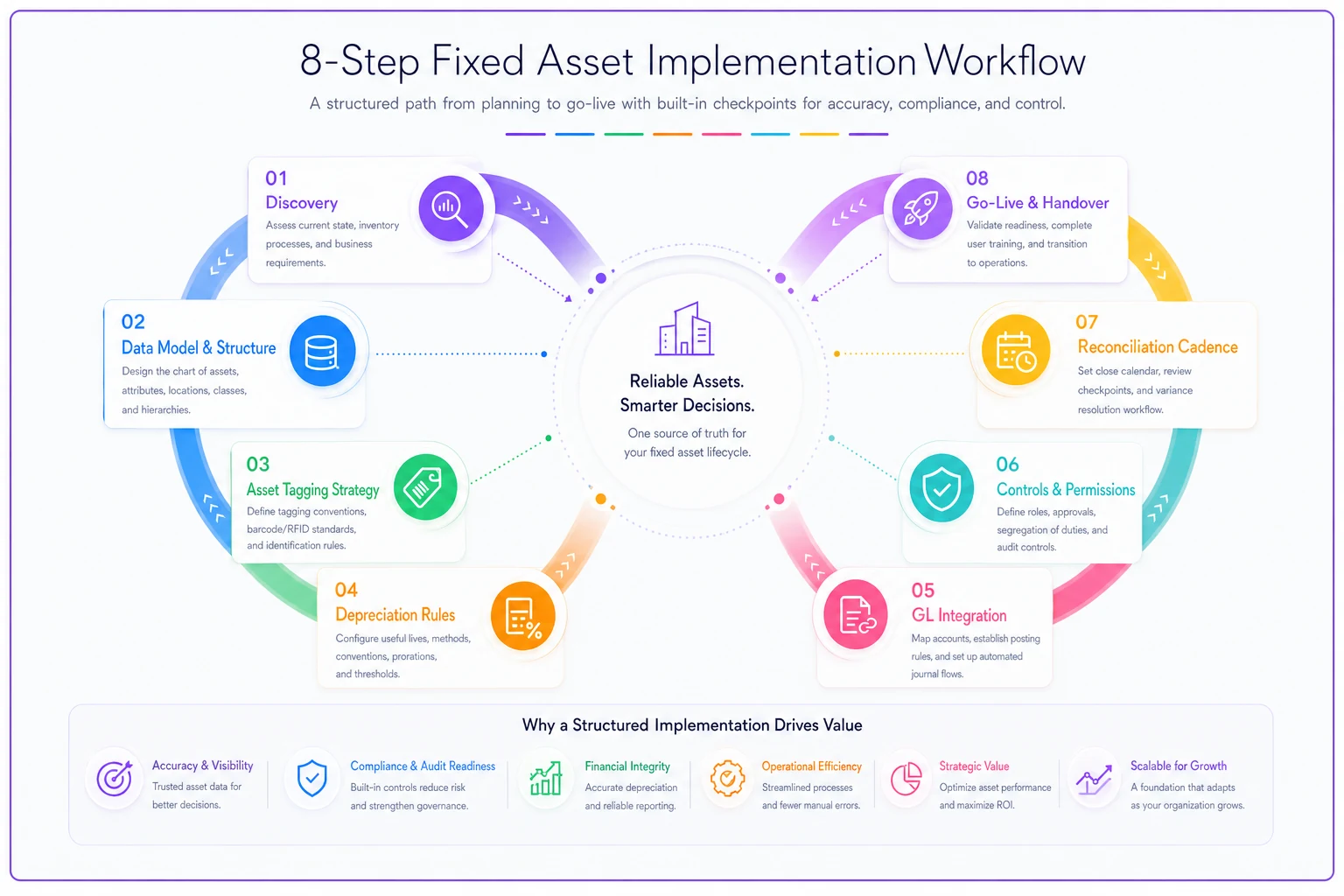
A simple visual of the sequence can help align stakeholders and highlight handoff points.
Step 1 — Discovery and Scope Freeze
Before anyone touches the software, you need written answers to four questions: what counts as an asset (capitalization thresholds by category), what's in scope for this register, what historical period you're carrying forward, and who owns which data domain.
The mistake here is leaving capitalization policy ambiguous. If your threshold is "$5,000" but nobody has decided whether that's per‑unit or per‑purchase‑order, you'll end up with fifteen $900 keyboards capitalized as a single $13,500 "IT bundle" that gets depreciated as a unit and can never be partially disposed. Decide the unit‑of‑capitalization rule before anything else.
Acceptance criteria: signed capitalization policy, documented scope boundary, named data owners for cost, depreciation, location, and tax.
Step 2 — Data Model and Field Mapping
This is where most of the long‑term accuracy is won or lost. You're defining the asset master structure — categories, sub‑categories, cost components, useful lives, depreciation methods, tax treatments — and mapping every legacy field to its new home.
The approach worth stealing: build a formal mapping document before migration, not a mental model. Here's a stripped‑down version of what that looks like:
| Legacy Field | Target Field | Transform Rule | Owner | Validation Check |
|---|---|---|---|---|
| ASSET_DESC | asset_description | Trim, title‑case | Asset Accountant | Non‑null, ≤120 chars |
| PURCH_DT | acquisition_date | Parse MM/DD/YY → ISO | Accounts Payable | ≤ inservicedate |
| INSVC | inservicedate | Default to PURCH_DT if null, flag for review | Asset Accountant | Not future‑dated |
| COST | gross_cost | Sum components if split | FP&A | Ties to GL subledger |
| METHOD | depreciation_method | Map codes (SL/DB/UOP) | Tax | Valid method per category |
| LIFE_MO | usefullifemonths | Integer | Asset Accountant | Within category band |
Every row needs an owner and a validation check. The "flag for review" transforms — like defaulting a missing in‑service date — are where silent errors hide. Those flagged records get a manual pass, not a blanket default.
Acceptance criteria: mapping document signed by each data owner; every target field has a source, a transform rule, and a validation check.
Step 3 — Tagging and Physical Inventory
Tag after the data model is frozen, because the tag ID scheme should align with how the system identifies assets. Tagging before the model is set is how you end up with two parallel numbering systems and a reconciliation nightmare.
Tag after the data model is frozen — the tag ID scheme should align with how the system identifies assets.
A physical inventory done alongside tagging catches ghost assets — the forklift sold in 2022 still sitting on the books at $31,000 net, the three CNC machines recorded as one. In practice, the first physical count after a long spreadsheet era tends to surface book‑to‑floor discrepancies on somewhere between 8–15% of asset lines. That's not a sign of fraud; it's accumulated drift from years without a count.
Acceptance criteria: every in‑scope asset physically verified or formally written off; tag IDs reconciled to asset master; discrepancy log with disposition for each exception.
Step 4 — Depreciation and Accounting Rules
Now you configure the engine: book depreciation, tax depreciation (often multiple tax books), any statutory or local books, mid‑month/mid‑quarter conventions, and the handling of partial periods, disposals, and transfers.
The verification that actually matters here is running depreciation on a known subset and checking it by hand. Pick 15–20 assets spanning every method and convention you use, calculate expected depreciation in a spreadsheet, and compare to the system output to the cent. If straight‑line on a 60‑month asset placed in service mid‑period doesn't match your hand calc, you've found a convention misconfiguration before it touches the GL — not after.
Acceptance criteria: parallel hand‑calculation matches system output across all method/convention combinations; disposal and transfer scenarios tested and documented.
Step 5 — ERP / GL Integration
This is where coordination between finance and IT breaks down most often. The subledger has to post to the GL cleanly — additions, depreciation expense, disposals, impairments — and the posting has to be reconcilable both directions.
The non‑negotiable design decision: the fixed asset subledger is the system of record for asset detail, and the GL holds the control total. You build a reconciliation that proves subledger detail equals GL balance for every asset‑related account, every period. If your EAM and ERP both think they own asset data, you get the handoff failures we've covered before — worth reviewing the operational model for event‑driven EAM–ERP workflows if your asset data originates in maintenance systems.
Acceptance criteria: automated subledger‑to‑GL reconciliation produces zero unexplained variance for a full test period; posting logic documented for every transaction type.
Step 6 — Controls and Segregation of Duties
Audit‑ready isn't only about accurate numbers — it's about proving no single person can create, modify, and approve an asset change unchecked. Map your roles so the person who adds an asset isn't the one who approves its capitalization, and disposals require a second approval tied to physical verification.
The common gap: everyone focuses on who can post and ignores who can change master data. Changing a useful life from 60 to 120 months quietly halves depreciation expense — a material P&L swing with no transaction trail unless master‑data changes are logged and reviewed. Make sure your configuration captures a full change history on fields that drive accounting outcomes. For retention and the ability to reconstruct what a record looked like at any past date, solid archival and audit‑replay patterns are worth building from the start.
Acceptance criteria: documented SoD matrix mapping roles to permissions; master‑data change log enabled and reviewable; conflicting‑duty combinations identified and either eliminated or compensated.
Step 7 — Reconciliation Cadence and KPIs
A register stays audit‑ready only if it's reconciled on a rhythm, not when an auditor asks. Define the cadence and the owner for each.
-
Monthly subledger‑to‑GL tie‑out for all asset accounts; depreciation expense variance vs. forecast.
-
Quarterly CIP (construction‑in‑progress) aging review — anything parked over 90 days gets a status; disposal completeness check.
-
Annually physical inventory on a rotating sample (20–25% of asset value, so the full base cycles every 4–5 years).
The KPIs worth tracking are narrow and honest: percentage of assets with complete source documentation, number of unreconciled subledger‑to‑GL items, average CIP age, and count of master‑data changes without documented approval. Resist the urge to build a 30‑metric dashboard. Four metrics that finance actually reviews beat thirty nobody opens.
Acceptance criteria: reconciliation calendar with named owners; first full monthly cycle completed with zero unexplained variance; KPI baseline recorded.
Step 8 — Go‑Live Acceptance
Go‑live isn't a date — it's a set of conditions met. Don't cut over because the project is running late. Cut over because the acceptance checklist is clean.
Go‑live acceptance checklist:
-
[ ] Full subledger reconciles to GL control totals for a complete parallel period
-
[ ] Sample of 40+ assets fully traceable
source document → cost → in‑service date → current NBV
-
[ ] Depreciation hand‑calc matches system across all methods/conventions
-
[ ] Physical inventory discrepancies all dispositioned
-
[ ] SoD matrix implemented and tested with actual user accounts
-
[ ] Master‑data change logging confirmed working
-
[ ] Reconciliation calendar assigned and first cycle rehearsed
-
[ ] Auditor walkthrough completed on the test environment with no open findings
That last one is the item people skip most often. Walk your external or internal auditors through the system before go‑live. Let them sample. Fixing a mapping error in UAT costs an afternoon. Fixing it after year‑end close is a restatement conversation.
A Reconciliation Template Worth Standardizing
The monthly subledger‑to‑GL reconciliation is the control that keeps everything honest. Structure it so anyone can pick it up:
-
Pull GL ending balance for each asset‑related account (gross cost, accumulated depreciation, CIP).
-
Pull corresponding subledger total for the same accounts.
-
Compute the variance per account.
-
For any non‑zero variance, list the individual transactions causing it with a one‑line explanation and a resolution owner.
-
Sign and date; attach the exception list.
-
Carry any unresolved item forward with an aging count — nothing drops off silently.
The discipline is in step 4. A reconciliation that just shows "variance: $0" with no supporting detail isn't evidence; it's a claim. Auditors want the worked detail, and a well‑configured fixed asset system should let you export that transaction‑level support directly rather than rebuilding it in a spreadsheet every month.
When a Full Re‑Implementation Makes Sense — and When It Doesn't
When it makes sense: your current register has structural problems — wrong unit of capitalization, no master‑data change history, depreciation methods you can't reconfigure, no clean path to the GL. These aren't fixable with cleanup; the foundation is wrong.
When it's overkill: your data is mostly sound and the real issue is process — no reconciliation cadence, unclear ownership, missing documentation. You don't need new software for that. You need a reconciliation calendar, a SoD matrix, and someone accountable. Ripping out a working system to solve a discipline problem just adds migration risk on top of your existing gap.
Who should not rush this: teams in the middle of an ERP upgrade. Sequencing a fixed asset implementation against a moving ERP target means your integration spec changes under you. Finish one, then do the other — or at minimum, lock the ERP data model before you build the asset‑to‑GL bridge.
A Real Scenario
A regional food processor ran its fixed assets in a spreadsheet alongside a basic ERP module that couldn't handle tax books. Around 2,800 active asset lines. Two recurring pain points: every quarter‑end, the asset accountant spent most of a week reconciling depreciation by hand, and their external auditors flagged the same issue two years running — in‑service dates that couldn't be tied to supporting documents on roughly 12% of sampled assets.
They moved to dedicated fixed asset management software, but the win wasn't the software itself — it was following the sequence. The data‑model and mapping work in Step 2 forced a decision on unit of capitalization that cleaned up around 300 bundled records. The physical inventory in Step 3 surfaced roughly 40 assets still on the books that had been scrapped. The auditor walkthrough before go‑live in Step 8 caught a convention misconfiguration on their mid‑quarter tax book that would have produced the wrong tax depreciation figure for the entire year.
After the first full year: quarter‑end asset reconciliation dropped from close to a week down to about a day and a half, the documentation finding disappeared entirely, and the depreciation hand‑checks now take a couple of hours because they're spot‑checks, not full rebuilds. No dramatic revenue story — just a register the CFO could sign without caveats and an audit that moved faster and cheaper.
Common Pitfalls That Quietly Break the Register
A few patterns show up across implementations, and each one is avoidable with the right step order.
-
Reconciling totals, not records. The aggregate ties, the details don't. Always sample at the record level.
-
Defaulting missing dates silently. Any auto‑populated in‑service or acquisition date must be flagged and manually reviewed — never blanket‑defaulted.
-
No master‑data change trail. Useful‑life and method changes move the P&L. If they aren't logged, you can't defend them.
-
CIP that never closes. Construction‑in‑progress with no aging review becomes a dumping ground. Assets sit there un‑depreciated for years, overstating the balance sheet.
-
Treating go‑live as a deadline. The acceptance checklist decides readiness, not the calendar.
-
Skipping the auditor preview. The people who will test your register should see it before it's live.
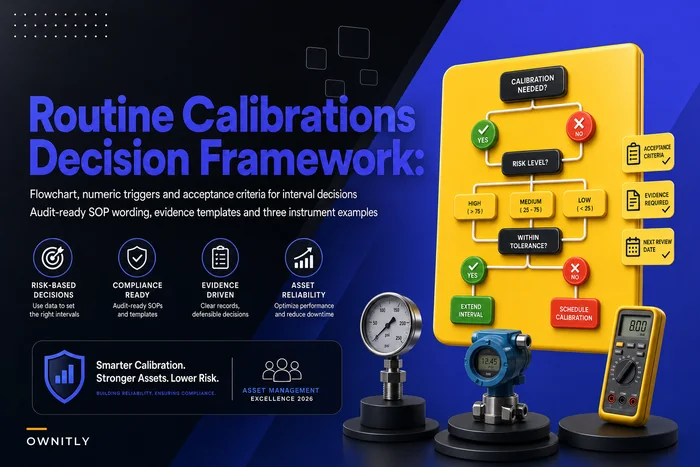
One more that's easy to miss: when asset data originates in a maintenance or EAM system and flows into finance, the capitalization timing and the depreciation decisions need to agree across both systems. If maintenance capitalizes a major overhaul that finance expensed, you have a reconciliation break at the source. The same discipline that governs routine vs. risk‑based maintenance decisions applies here — document the decision rule once, apply it consistently, and both systems stay in agreement.
What Finance and Audit Should Expect to See
An audit‑ready register has a few consistent properties, regardless of which software you chose:
-
Every asset traces to a source document, a cost, an in‑service date, and a current net book value — in a single click, not a scavenger hunt.
-
The subledger ties to the GL every period, with worked detail behind any variance.
-
Changes to accounting‑relevant fields are logged, timestamped, and attributed.
-
Depreciation is reproducible by hand for any asset.
-
Disposals require physical verification and a second approval.
-
The whole thing runs on a documented reconciliation cadence with named owners.
Hit those six and you'll pass the detailed testing that catches most teams off guard. More importantly, you'll close faster every period because the controls are doing the work instead of your month‑end heroics.
Closing Thought
The difference between a fixed asset implementation that survives its first real audit and one that generates findings isn't budget or software tier. It's whether the team respected the sequence — model before tagging, controls before integration, acceptance criteria before a go‑live date — and whether they tested at the record level instead of trusting the totals. Build it in that order, prove each step against its acceptance criteria, and the register stops being a quarterly fire drill and becomes something you can actually sign your name to.
Ready to elevate your asset operations?
Join 1,500+ businesses using Ownitly to optimize asset utilization, reduce downtime, and ensure compliance.